01 · Intermediate quantities
f₀ is the corner or centre frequency, Fs the sample rate, Q the quality factor and G the peak gain in dB (peaking and shelf types only).
Playground · app-grounded instrument
DSP · AudioHear a cascade, not just see a curve. Design 1–4 biquads in series, watch the exact magnitude + phase of the total chain, and preview live on real audio — white noise, oscillator, or mic — using the same DF2T core Biquadia ships.
Current chain coefficients (normalized, a0=1)
Uses Web Audio IIRFilterNode with the exact coefficients above. Pick a source, hit play, toggle bypass to hear the chain.
DF2T — JavaScript
// Direct Form II Transposed — one biquad stage
// y[n] = b0*x[n] + b1*x[n-1] + b2*x[n-2] - a1*y[n-1] - a2*y[n-2]
// State: z1 = b1*x[n-1]+b2*x[n-2]-a1*y[n-1]-a2*y[n-2], z2 = b2*x[n-1]-a2*y[n-1]
function biquadProcess(x, b0,b1,b2,a1,a2, state){
  const y = b0*x + state[0];
  state[0] = b1*x - a1*y + state[1];
  state[1] = b2*x - a2*y;
  return y;
}
// Cascade: for (const stage of cascade) x = biquadProcess(x, ...stage.coeffs, stage.state);
Reference implementation for your own code — the designer above computes frequency response, not this time-domain recurrence.
DF2T — Swift (Biquadia)
// Swift — same DF2T, stereo-safe
struct Biquad {
  var b0,b1,b2,a1,a2: Double
  var z1: Double = 0, z2: Double = 0
  mutating func process(_ x: Double) -> Double {
    let y = b0 * x + z1
    z1 = b1 * x - a1 * y + z2
    z2 = b2 * x - a2 * y
    return y
  }
}
Swift port for your own project.
Every knob and curve above answers to the RBJ cookbook below. Here is what each piece is actually doing.
Stage cards. Each card is one biquad. Type selects the RBJ formula branch, freq sets w0 = 2πf0/Fs, and gain only affects peaking/shelf types. Q sets alpha = sin(w0)/(2Q) for every type except the two shelves, which fix the slope at S = 1 exactly as Web Audio’s BiquadFilterNode does — their Q input is disabled rather than left to look live. Removing a stage splices the chain — the remaining stages recompute and redraw instantly.
Magnitude + phase plot. For each frequency from 20 Hz to 20 kHz (log-spaced, 400 steps), the script evaluates every stage's transfer function H(e^jω) on the unit circle via exact complex arithmetic, then multiplies all Hk for the cascade. dB is 20 log10|H_total|. Phase is the sum of arg(Hk), wrapped to [-180°, 180°]. The plot is not a visual approximation — those curves are the literal mathematical response of the coefficients you see.
Coefficient readout. The real-time b0,b1,b2,a1,a2 for every stage, normalized to a0=1. These are the exact numbers fed to Web Audio's IIRFilterNode and the same format Biquadia's Metal kernel expects. Copy them into any DF2T implementation and the filter is identical.
Web Audio chain. Source → IIRFilterNode × N → Gain → destination. Each IIRFilterNode is constructed from the current biquad coefficients with feedforward [b0,b1,b2] and feedback [1,a1,a2]. Changing any parameter tears down and rebuilds the chain — new IIR nodes, clean state, no pops.
Noise generators. White noise is Math.random() × 2 − 1. Pink noise uses the Voss-McCartney algorithm (seven white noise sources at octave intervals) producing −3 dB/octave rolloff — flatter to the ear. Sine is a standard OscillatorNode at 440 Hz. The sweep does an exponential ramp from 20 Hz to 20 kHz over 8 seconds.
Bypass toggle. Disconnects the IIR chain and reconnects source directly to gain — zero added latency, direct A/B. The coefficients stay live in the readout, so the plot still shows what you are not hearing. Toggling bypass back rebuilds the chain from the same coefficients.
What the render loop evaluates per pixel
This is computed 400 times per plot redraw — once per log-spaced frequency bin. Each evaluation unpacks to a complex division: real/imag numerator divided by real/imag denominator. The cascade multiplies complex numbers, not dB — the dB display is the final step.
One stage is five numbers. The designer uses the RBJ Audio EQ Cookbook: three intermediate quantities, then a row of coefficients per filter type, then a division by a0.
01 · Intermediate quantities
f₀ is the corner or centre frequency, Fs the sample rate, Q the quality factor and G the peak gain in dB (peaking and shelf types only).
02 · Low-pass
At f₀ the magnitude is exactly Q, so Q = 1/√2 puts the corner at −3.01 dB.
03 · Peaking EQ, then normalise
Every type divides all six values by a₀, which leaves the five numbers b₀, b₁, b₂, a₁, a₂ in the readout. The gain at f₀ is exactly G dB.
Both are solved when the page is built, by the same rbjCoeffs and freqResponse functions the designer runs, and checked against the cookbook formulas in the site's test suite. The same cookbook design is available as an embeddable card and an API at /api/v1/biquad-design, which takes type, freq, fs, q and gain.
A · A 1 kHz low-pass at 48 kHz
f₀ = 1000 Hz, Fs = 48000 Hz, Q = 0.7071.
With a0 = 1, the filter runs as y[n] = b0·x[n] + b1·x[n−1] + b2·x[n−2] − a1·y[n−1] − a2·y[n−2]. The response is 20·log10(Q) = -3.01 dB at the corner and falls 9.365 dB further over the next octave. At Nyquist the response is zero, which is −∞ dB.
B · A +3 dB peaking EQ at 2.5 kHz
f₀ = 2500 Hz, Fs = 48000 Hz, Q = 1.41, G = 3 dB.
A peaking filter returns to 0 dB at both ends and reaches exactly G at f₀. Here b1 = a1 = -1.728121: both are −2·cos(ω₀)/a₀ for this type.
Biquadia stack · 15 picks
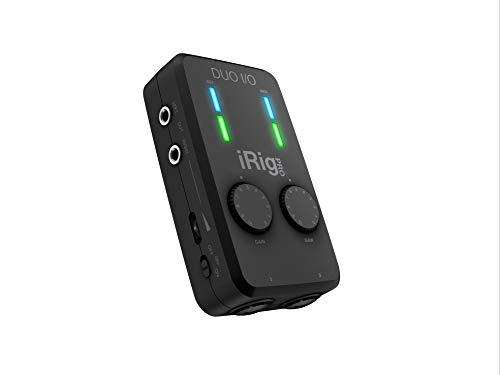 Audio interface
Portable 2-channel USB-C audio interface used for mobile Biquadia field recording.
 $229.00Audio interface
Audio interface used building Biquadia — 8-preamp USB I/O for real-time DSP testing.
 $9.99Power
Power supply used for Raspberry Pi builds and Biquadia's studio desk.
 $9.99Audio
MEMS mic breakout used for real-time DSP experiments feeding into Biquadia.
 $110.61Book
Biquad-based effects: peaking, shelving, allpass for phaser — agentic pipeline's RAG over DAFX generates the same C++ kernel clang++ verifies here.
 $49.99Microphone
USB-C calibrated mic for iPhone/iPad — take to listening room and verify room-mode eigenfrequencies against calculator's mode list up to 300Hz.
 Microphone
USB cal mic for nearfield SPL and cone-breakup waterfall — capture the CSD breakup modes this simulator predicts via modal superposition.
 $80.49Book
Chapter on biquad Direct Form II transposed and pole-zero placement — move poles in pole-zero explorer and hear Q/ω0 map to ring frequency as Proakis derives.
 Kit
KitFeed a square wave into your scope and see its Fourier epicycles live — same harmonic decomposition (odd k only) this page animates as rotating vectors.
 Book
BookIntuitive pole-zero explanation — why a pole near unit circle rings, zero near kills — the exact intuition this pole-zero explorer makes tangible with drag-to-listen.
 $237.00Microphone
Portable stereo condenser mic kit used for Biquadia field/video capture.
 $247.44Book
Defines the DTFT, DFT, and complex Fourier coefficients c_k this visualizer computes — chapters 3-5 derive the exact reconstruction formula tracing your doodle.
 $26.80Microcontroller
600 MHz M7 — flash the DF2T biquad cascade from Biquadia’s DSP core (pair with the Rev D audio shield for codec I/O) and hear the same filter your design exports here.
 $124.53Book
Chapter on DFT and windowing explains spectral leakage and Gibbs phenomenon visible as overshoot when you draw sharp corners in the epicycles tracer.
 $8.99Audio
USB audio interface used in early Biquadia MEMS-mic prototyping.
Prices shown were retrieved from the Amazon Product Advertising API on 8 October 2026 and are indicative only — the price and availability on Amazon at the time of purchase apply.
More gear across every app: the full Gear list →
RBJ α inversion
LLMs love writing (inverted). The correct formula is . A high-Q filter with inverted α shifts the cutoff by an octave and changes the shape entirely. This page uses the real RBJ — check the α line in the script if you are porting it to your own codebase.
Cascade phase pile-up
Each biquad adds its phase shift to the total. Four stages can easily exceed ±360° of total phase at Nyquist. That is not a bug — it is real group delay. If you stack four high-Q peaking filters, you will hear audible pre-ringing on transients. Phase-wrapping the plot to ±180° hides this, but your ears and an oscilloscope will not be fooled.
Compute w0 = 2π·f0/Fs and alpha = sin(w0)/(2Q). For a low-pass: b0 = (1 − cos w0)/2, b1 = 1 − cos w0, b2 = (1 − cos w0)/2, a0 = 1 + alpha, a1 = −2·cos w0, a2 = 1 − alpha. Divide all five by a0 so that a0 = 1. For a 1000 Hz low-pass at Fs = 48000 Hz and Q = 0.7071 this gives b0 = 0.003916, b1 = 0.007832, b2 = 0.003916, a1 = -1.815340, a2 = 0.831004. The designer above computes the same cookbook formulas for eight filter types and shows the normalised numbers under "Current chain coefficients".
Yes. Choose the Peaking type and set frequency, Q and gain. With A = 10^(gain/40), the peaking filter uses b0 = 1 + alpha·A, b1 = −2·cos w0, b2 = 1 − alpha·A, a0 = 1 + alpha/A, a1 = −2·cos w0, a2 = 1 − alpha/A, then divides by a0. A 2500 Hz peak at Q = 1.41, +3 dB and Fs = 48000 Hz gives b0 = 1.036103, b1 = -1.728121, b2 = 0.788870, a1 = -1.728121, a2 = 0.824972. Its gain at 2500 Hz is 3 dB, and it is 0 dB at DC and at Nyquist.
DF2T uses two state variables per biquad instead of four. Fewer state variables mean less memory and less quantization noise because you only round once per sample instead of twice. The transposed topology also eliminates the feed-forward delay line. The trade-off is that the internal node can clip at high Q if not guarded with saturation — Biquadia clamps z1/z2 after every sample for exactly this reason.
The RBJ cookbook formulas compute w0 = 2π f0 / Fs. Changing Fs changes w0, which cascades through every cos/sin computation and alpha. A 1 kHz lowpass at 48 kHz and 44.1 kHz needs different b0–a2 to hit the same f0. The frequency response recalculates automatically, but if you are switching rates mid-audio-stream in a real app, you must recompute all coefficients at the new Fs before the next buffer.
Yes — on a 180 MHz Cortex-M4 with a CMSIS-DSP biquad cascade, you can run 30–60 biquads at 48 kHz before hitting the real-time deadline. Each DF2T stage costs 5 MACs per sample. At 48 kHz, 60 stages is 14.4 MMAC/s — well within budget. Q format (Q1.31 fixed-point) matters more than stage count. See the MPU9250 field note for Biquadia's fixed-point DF2T ARM implementation used on-device.
High Q means poles are close to the unit circle — near |z| = 1. The impulse response is an exponentially-decaying sinusoid where decay rate = ln(r) per sample. At Q = 10 and f0 = 1 kHz, r ≈ 0.96, so it takes about 100 samples (~2 ms) to decay to 10%. That ringing is not a bug — it is what makes a resonant filter sound like an instrument body or a room mode.
Biquadia serializes cascade coefficients into a Metal buffer, then dispatches one compute kernel per audio channel. Each thread processes a DFT block (512–4096 samples), pulling coefficients from the buffer and applying DF2T in an unrolled loop. The GPU's SIMD lanes handle stereo pairs in parallel. The same kernel verified via Accelerate vDSP on CPU for bit-exact cross-check. The Metal path adds ~0.3 ms latency at 512-sample blocks.
Coefficient export
Four ways, all free, none metered
curl "https://makerportal.ai/api/v1/biquad-design?type=highpass&freq=80&fs=48000&q=0.707" returns the same solve as JSON. No key, no account, CORS open; add &include=curve for the 240-point response.None of that sits behind a sign-in, an email or a limit, and none of it is going to.
What this page does not do
It solves and it plots. It does not capture audio, it does not run a file or a batch offline, and outside this tab it is not in your device's audio graph. Those are the jobs a native app exists for, and the studio ships one.
Biquadia — Local Neural DSP & Sound Laboratory. CoreML · Neural Engine (ANE) · Metal Shaders · Native Swift. iOS (iPhone + iPad).
Shareable still
This 16:9 frame is rendered from the real browser instrument above. It is the page's canonical preview for image search, link unfurls, and posts that need to show what the tool actually does.
Download 1280 × 720 JPEG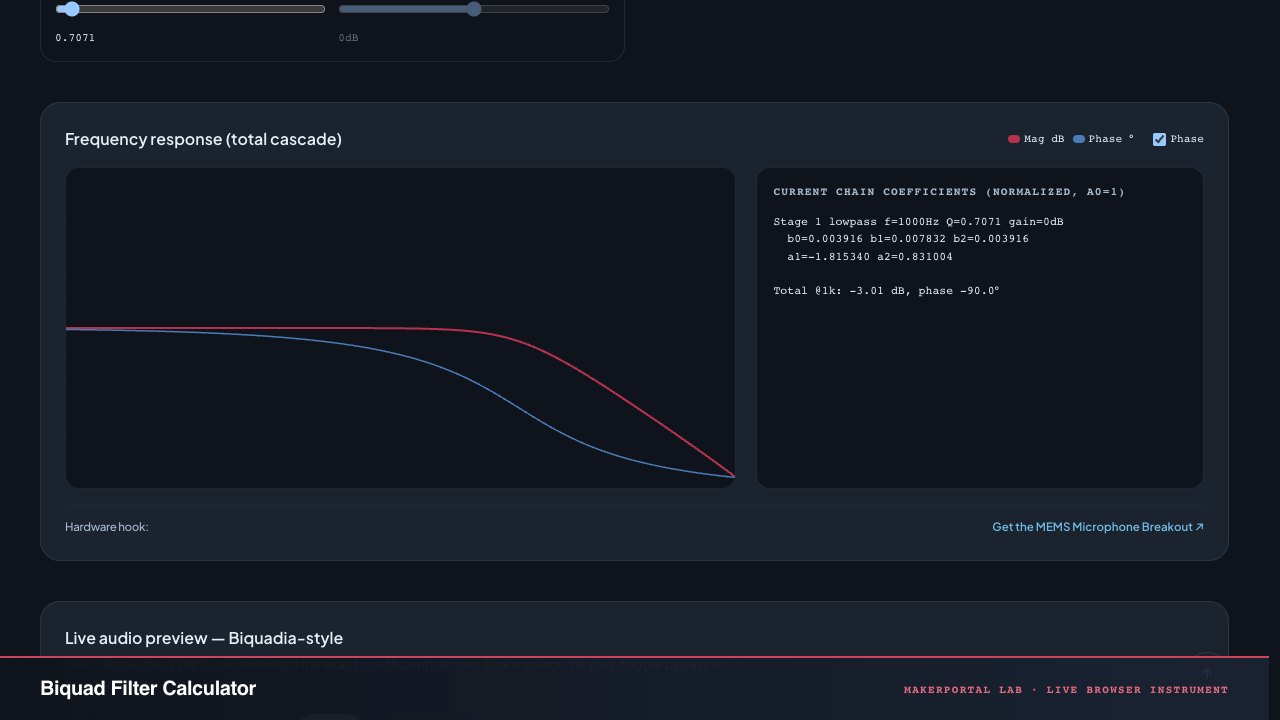
Continue the experiment