Playground · research instrument
DSP · AudioVoice Synthesis DSP Sandbox
Type text, synthesize a voice, and push it through a real Web Audio DSP rack — bandpass, feedback echo, RT60-controlled convolution reverb, pitch resampling — with a live waveform + spectrogram analyzer. Works out of the box with a built-in demo voice; plug in your own ElevenLabs API key for production-grade synthesis.
Independent research instrument — not claimed as MakerPortal shipped product code. Methods, equations, assumptions, and limitations are disclosed so you can inspect what the page does and does not establish.
Read the field note →Voice synthesis sandbox
DSP rack — acoustic environment
Waveform — post-DSP
Spectrogram — 0–8 kHz, scrolling
Anatomy: PCM chunks → Web Audio buffers
How a streaming TTS response becomes gap-free audio inside the browser — the exact pipeline the Code section implements.
- 01
WebSocket frames arrive. Each message carries base64-encoded 16-bit little-endian PCM at the sample rate you requested (
pcm_44100). Chunk sizes vary with generation speed — you cannot assume a fixed cadence. - 02
Decode to Float32. base64 →
Uint8Array→DataView.getInt16(i, true)÷ 32768. NodecodeAudioDataneeded for raw PCM — that call is for containered formats (MP3/OGG) and adds latency. - 03
Wrap in an AudioBuffer.
createBuffer(1, n, 44100)+copyToChannel. Each chunk becomes an independentAudioBufferSourceNode— they are one-shot and cheap by design. - 04
Schedule on an absolute playhead.
src.start(playhead); playhead += buf.duration. Becausestart(t)is sample-accurate, back-to-back scheduling produces zero audible seams. A ~150 ms lead overcurrentTimeabsorbs network jitter. - 05
Enter the DSP rack. Sources connect into the same chain you hear on this page: input gain → bandpass biquad → parallel dry / echo (delay + feedback) / reverb (convolver) → master gain → analyser → speakers.
Chunks of unpredictable size become a seam-free stream because start() is sample-accurate against an absolute playhead.
Gear behind this build
Voice workstation stack · 6 picks
Mics · monitors · interfaces6
 $159.00Headphones
Audio-Technica ATH-M50X Professional Studio Monitor Headphones, Black, Professional Grade, Critically Acclaimed, with Detachable Cable
Reference monitoring headphones used for akous's binaural audio testing.
 $229.00Audio interface
Behringer UMC1820 Audiophile 18x20 USB Audio/MIDI Interface with Midas Mic Preamplifiers and ADAT I/O | For Recording Microphones and Instruments
Audio interface used building Biquadia — 8-preamp USB I/O for real-time DSP testing.
 $54.99Microphone
Blue Yeti Nano Premium USB Microphone - Shadow Grey (Renewed)
Compact USB condenser mic used for nymic testing.
 $168.00Microphone
RØDE NT-USB+ Professional-Grade USB Condenser Microphone for Recording
USB condenser mic used for nymic testing.
 $319.00Microphone
Shure MV7+ USB-C & XLR Podcast Dynamic Mic with Stand - Black
USB/XLR hybrid mic used building and testing nymic.
 $98.00Headphones
Sony MDR7506 Professional Large Diaphragm Headphone
Reference studio headphones used for akous's binaural audio testing.
Prices shown were retrieved from the Amazon Product Advertising API on 8 October 2026 and are indicative only — the price and availability on Amazon at the time of purchase apply.
More gear across every app: the full Gear list →
Hardware Kit Builder
Build the physical voice-synthesis workstation. Select components below for a live bill of materials.
Build this lab
Voice synthesis workstation
USB/XLR broadcast mic + closed-back monitors + multichannel interface — record reference takes, monitor DSP chains without room bleed, and route synthesized voice through outboard gear.
- $319
- $159
- $229
- $55
- $98
Prices shown were retrieved from the Amazon Product Advertising API on 8 October 2026 and are indicative only — the price and availability on Amazon at the time of purchase apply.
Estimated total
$707
Prices from Amazon catalog cache · may change
The DSP math, in full
RT60 decay envelope
The impulse response is white noise n(t) under an exponential envelope. −60 dB in amplitude is a factor 10⁻³, and e^(−6.91) ≈ 10⁻³ — so energy decays exactly 60 dB over RT60. Sabine connects RT60 to a physical room: RT60 = 0.161·V/A (V in m³, A in sabins).
Bandpass biquad response
Web Audio's bandpass BiquadFilterNode: unity gain at the center frequency f₀, −3 dB bandwidth f₀/Q. Q = 0.3 is nearly transparent; Q > 5 gives the classic “telephone” band-limit that makes speech sound distant.
Streaming latency budget
Time to first audible sample = network time-to-first-chunk + PCM decode (µs, negligible) + jitter lead (~150 ms chosen) + graph base latency + hardware output latency. The sandbox reads the last two from your AudioContext and measures TTFB when you use your own key.
Echo as a feedback comb
DelayNode + feedback gain g is a comb filter: repeats every T_D seconds decaying by g each pass. Total decay to −60 dB takes T_D·log(10⁻³)/log(g) — at g = 0.5 and 220 ms, about 2.2 s of audible tail. Keep g < 0.85 or energy accumulates toward instability.
Pitch by resampling
playbackRate r shifts every frequency by the same ratio and shortens duration — chipmunk artifacts included, formants shift too. Time-preserving pitch shift needs a phase vocoder or granular resynthesis (an AudioWorklet job, out of scope here — and we say so rather than fake it).
Production streaming code — WebSocket → sample-accurate scheduling
Complete TypeScript for the streaming pipeline in the Anatomy diagram. Drop your voice ID and key in; the scheduler works for any chunked-PCM source, not just ElevenLabs.
// ElevenLabs WebSocket streaming -> Web Audio scheduling (TypeScript)
// PCM route: request pcm_44100 and schedule raw Float32 chunks gap-free.
const VOICE = 'YOUR_VOICE_ID';
const ctx = new AudioContext({ sampleRate: 44100 });

let playhead = 0; // absolute schedule time in ctx time
const LEAD = 0.15; // s of jitter buffer before first chunk plays

function scheduleChunk(f32: Float32Array) {
  const buf = ctx.createBuffer(1, f32.length, 44100);
  buf.copyToChannel(f32, 0);
  const src = ctx.createBufferSource();
  src.buffer = buf;
  src.connect(ctx.destination); // or into your DSP chain input node
  if (playhead < ctx.currentTime + 0.02) playhead = ctx.currentTime + LEAD;
  src.start(playhead);
  playhead += buf.duration; // back-to-back, sample-accurate
}

function pcm16ToF32(bytes: Uint8Array): Float32Array {
  const view = new DataView(bytes.buffer, bytes.byteOffset, bytes.byteLength);
  const out = new Float32Array(bytes.byteLength / 2);
  for (let i = 0; i < out.length; i++) out[i] = view.getInt16(i * 2, true) / 32768;
  return out;
}

export function streamTTS(text: string, apiKey: string) {
  const ws = new WebSocket(
    `wss://api.elevenlabs.io/v1/text-to-speech/${VOICE}/stream-input` +
    `?model_id=eleven_multilingual_v2&output_format=pcm_44100`
  );
  ws.onopen = () => {
    ws.send(JSON.stringify({ text: ' ', xi_api_key: apiKey })); // handshake
    ws.send(JSON.stringify({ text, try_trigger_generation: true }));
    ws.send(JSON.stringify({ text: '' })); // EOS
  };
  ws.onmessage = (ev) => {
    const msg = JSON.parse(ev.data);
    if (msg.audio) {
      const bytes = Uint8Array.from(atob(msg.audio), (c) => c.charCodeAt(0));
      scheduleChunk(pcm16ToF32(bytes));
    }
    if (msg.isFinal) ws.close();
  };
}Export · Soft gate
Export DSP preset + unlock clean WAV
Synthesize voice and route through a Web Audio DSP rack: bandpass filters, feedback echo, RT60 convolution reverb, and pitch resampling.
File · voice-dsp-preset.json
voice-dsp-preset.jsonapplication/json+ watermark line on free pathFree download adds a small footer:
/* Export from makerportal.ai — free watermarked build. Unlock …Clean export removes footer. Both are generated fresh from your current sim tuning.
Privacy: email stays in your browser localStorage (mp_export_email_elevenlabs-dsp-sandbox) + unlock flag (mp_export_unlock_elevenlabs-dsp-sandbox). If Buttondown username is configured, we also POST to Buttondown (privacy-first mode, no tracking pixels per D-014). See privacy → affiliates & email.
Unlock clean export
Soft gate — no hard paywall, no Clerk. Email stays local unless you explicitly check the newsletter box. Unsubscribe anytime. RSS at /rss.xml.
✓ Lab Pro — clean export on every lab
Your licence unlocks this and every other gated simulator, so there is nothing to enter here. Manage or sign out on the shop page.
✓ Unlocked — clean exports enabled
Stored in mp_export_unlock_elevenlabs-dsp-sandbox. Clean file omits watermark. Re-lock via browser devtools → localStorage.
Frequently asked questions
Does this page call ElevenLabs without my permission?
No. By default the sandbox uses a built-in client-side formant demo voice (clearly labeled — it is a toy synthesizer, not ElevenLabs output) or your microphone. Only if you paste your own ElevenLabs API key does the browser call api.elevenlabs.io directly. The key is stored in your localStorage only (mp_elevenlabs_key), never sent to MakerPortal — this site has no tracking backend.
How is the reverb generated from RT60?
The ConvolverNode impulse response is procedurally generated: white noise shaped by an exponential decay envelope e^(−6.91·t/RT60), so the energy falls exactly 60 dB over the RT60 you set. Moving the slider regenerates the IR. This is the standard Schroeder-style synthetic room tail — statistically like a real room decay, without early-reflection geometry.
Why is pitch shift disabled in microphone mode?
The pitch control uses AudioBufferSourceNode.playbackRate — resampling the decoded buffer by 2^(semitones/12). A live MediaStreamSource has no playbackRate; true real-time pitch shifting needs a granular or phase-vocoder AudioWorklet, which changes latency and quality tradeoffs. Rather than fake it, the control disables and says so.
What exactly does the latency readout measure?
Two real numbers from your browser: AudioContext.baseLatency (the render-quantum buffering of the audio graph) and outputLatency (estimated hardware output delay), plus — only after you run a synthesis with your own API key — the measured wall-clock time-to-first-byte and total fetch time of the actual ElevenLabs request. Nothing is estimated or invented; fields show “—” until measured.
How does streaming TTS map onto Web Audio in production?
ElevenLabs’ WebSocket endpoint sends base64 PCM chunks. You decode each chunk into a Float32 AudioBuffer, and schedule buffers back-to-back with AudioBufferSourceNode.start(t) where t advances by chunk duration — keeping a small lead (~2 chunk durations) over context.currentTime to absorb network jitter. The Code section below is a complete TypeScript implementation of that scheduler.
Shareable still
The instrument, captured—not illustrated.
This 16:9 frame is rendered from the real browser instrument above. It is the page's canonical preview for image search, link unfurls, and posts that need to show what the tool actually does.
Download 1280 × 720 JPEG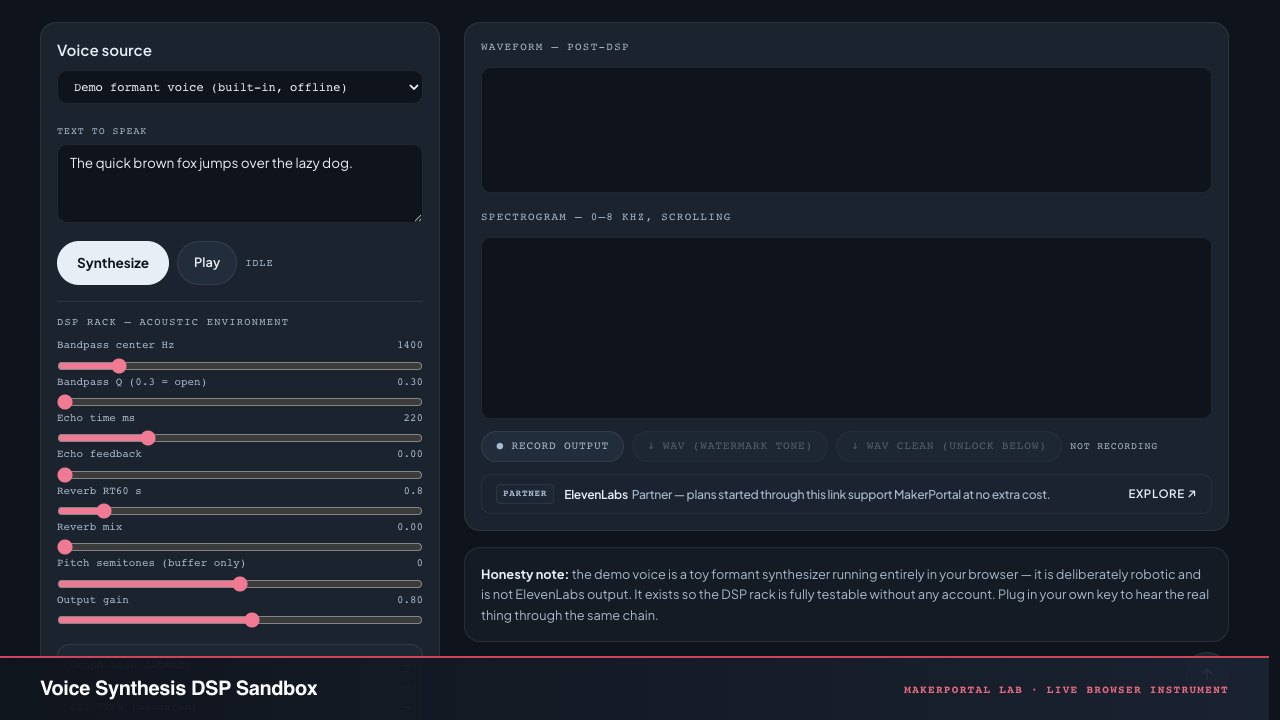
Continue the experiment