Playground · app-grounded instrument
DSP · AudioHead-Tracked Stereo Pan
Rotate a virtual head, hear the pan move. Yaw from the quaternion converter drives a live StereoPannerNode + 3D PannerNode — the exact head-tracking → spatial-audio link MotionLink uses to keep audio locked in space as you turn.
Virtual head (from quaternion)
Drag to rotate. Left/right = yaw (Z), up/down = pitch (Y), Shift = roll (X). Same math as quaternion converter. Red = nose (+X forward), green = left ear (+Y), blue = up (+Z). At 0°,0°,0° you see top-front isometric.
Spatial audio — hear it
Source is fixed in front of you. As you yaw your head, the sound stays world-locked — it pans to the ear opposite your turn. This is how MotionLink + Biquadia keep a live mix stable while you move.
Stereo pan (-1 left → 1 right)
Listener forward (from quat)
0,0,1
Simple pan = sin(yaw)
0
3D Panner position (source fixed world-locked)
Source at (1, 0, 0) world = in front of head at 0° yaw. Listener at origin, orientation from quaternion.
yaw 0° → pan 0
JS — quaternion to listener
// JS: yaw -> StereoPannerNode (simple)
// For full 3D, use PannerNode + AudioListener orientation from quaternion
function quatToYaw(q){ // same as quaternion-euler page
  const yaw = Math.atan2(2*(q.w*q.z + q.x*q.y), 1-2*(q.y*q.y + q.z*q.z));
  return yaw;
}
const panner = audioCtx.createStereoPanner();
panner.pan.value = Math.sin(yaw); // -1 left, 1 right
// 3D: listener forward from quat
const fwd = [2*(q.x*q.z+q.w*q.y), 2*(q.y*q.z-q.w*q.x), 1-2*(q.x*q.x+q.y*q.y)];
audioCtx.listener.forwardX.value = fwd[0];
audioCtx.listener.forwardY.value = fwd[1];
audioCtx.listener.forwardZ.value = fwd[2];
Web Audio wiring for your own page — this lab drives the pan from Euler sliders, so it never needs quaternion→yaw.
Swift — MotionLink
func updateListener(from q: CMQuaternion, listener: AVAudioEnvironmentNode) {
    // CMQuaternion -> forward vector for listener orientation
    let fwd = simd_float3(
        x: Float(2*(q.x*q.z + q.w*q.y)),
        y: Float(2*(q.y*q.z - q.w*q.x)),
        z: Float(1 - 2*(q.x*q.x + q.y*q.y))
    )
    listener.listenerAngularOrientation = AVAudioMakeAngularOrientation(fwd)
}
Swift for your own app.
How head tracking becomes left/right
Your ears never move in world space. The world spins around you. Turn left 60°, keep a speaker fixed in front of the room, and now that speaker is 60° to your right — louder in the right ear. World-locked audio means compensating for head rotation so sources stay put while you move.
MotionLink solves this with one sensor stream: CMHeadphoneMotionManager.attitude.quaternion. A unit quaternion q = (x,y,z,w) with no gimbal lock. From it we extract yaw, build a forward vector, and drive both a cheap StereoPannerNode and a proper 3D PannerNode. The demo above lets you hear both at once.
Intuition in 20 seconds
At 0° yaw you face +X. Source at +X is centered. Yaw left is positive Z rotation. The head turns left, the source should pan right. So pan = sin(yaw) works: 0 at 0°, +1 at +90° left turn = source hard right, -1 at -90° = hard left. No trig beyond that for stereo.
For full 3D we don't pan at all — we rotate the listener. Source stays at (1,0,0). Listener stays at origin. Only orientation changes. WebAudio's HRTF panner then does interaural time and level difference for you.
Playbook mental model
- Fixed world: source at +X.
- Head turns → yaw changes → forward vector swings.
- Left turn → right ear dominance. You hear source move right, but it didn't.
- Right turn → opposite.
Top view. Yaw left = positive. Forward vector rotates left, pan goes right to keep source world-locked.
Yaw from quaternion — no Euler gimbal trap
yaw = atan2(2(w·z + x·y), 1 − 2(y² + z²))
That's ZYX convention matching CMHeadphoneMotionManager where +Z yaw is left turn, +Y pitch is up, +X roll is ear-to-shoulder. Clamp pitch asin input to [-1,1] to avoid NaN at ±90°. Yaw never singularities here — it extracts cleanly even at pitch = ±90° where Euler yaw+roll become ambiguous. This page uses the same formula as quaternion converter.
Forward vector from quaternion
fwd = [2(xz + w·y), 2(yz − w·x), 1 − 2(x² + y²)]
Rotate the basis vector +X = [1,0,0] by quaternion q: f = q · [1,0,0] · q⁻¹. Expand Hamilton product → this closed form. No matrix needed. In Swift SIMD, same 3 lines. Feed f into AVAudioEnvironmentNode.listenerAngularOrientation or WebAudio listener.forwardX/Y/Z.
Cheap stereo (what you hear first)
pan = sin(yaw) ∈ [−1, 1]
StereoPannerNode pan: −1 left, 0 center, 1 right
Sinusoidal law sounds more natural than linear yaw/90° because it preserves power. At 60° yaw, sin(60°)=0.866 — almost hard-panned but not brutal. Keep gain at 0.3 in demo so pink noise peaks don't clip when summed. Works for headphones only; speakers need more.
True 3D — HRTF path
source pos = (1,0,0) world
listener pos = (0,0,0)
listener fwd/up from q
PannerNode.panningModel = 'HRTF'
Don't move the source. Move listener orientation. WebAudio computes interaural time difference (ITD) and level difference (ILD) via built-in HRTF. For vertical, add up = [2(xy − w·z), 1−2(x²+z²), 2(yz + w·x)]. AVAudioEnvironmentNode uses same fwd+up pair. That's production path in Biquadia's head-tracked monitor.
Implementation playbook — MotionLink → WebAudio / AVAudioEngine
- Read quaternion at 60 Hz:
motionManager.startDeviceMotionUpdates(to: queue)→data.attitude.quaternionon AirPods Pro. Store first quaternion as baseline — zero is wherever headphones were when you called start, not north. - Relative rotation:
q_rel = q_current * q_baseline_inverse. Without this, head center drifts every launch. - Extract yaw for quick pan:
yaw = atan2(2(q.w*q.z + q.x*q.y), 1−2(q.y*q.y + q.z*q.z))→panner.pan = sin(yaw). Latency ~20 ms, cheap, good enough for music. - Extract forward + up for HRTF: Use closed forms above. iOS:
AVAudioMakeAngularOrientation(fwd). Web:audioListener.forwardX/Y/Z + upX/Y/Z. Keep source fixed. - Smooth it: One-pole lowpass at 8 Hz on yaw:
y_filt += (y − y_filt) * (1−exp(-2π*8*dt)). Kills sensor jitter without adding lag you can feel.
Why StereoPannerNode then PannerNode?
StereoPanner is a constant-power law: two gains gL,gR with gL²+gR²=1. It does not model head shadow. PannerNode in HRTF mode does — comb filtering above 4 kHz that your brain reads as direction. This demo chains both so you can bypass and hear difference. On iOS, replace with AVAudioEnvironmentNode which is same HRTF core but Metal-accelerated.
Honesty — what this demo fakes
- StereoPanner gives azimuth only. No elevation, no distance, no front/back discrimination. Real 3D needs HRTF or Ambisonics.
- WebAudio HRTF dataset is generic KEMAR, not your personal HRTF. Front/back confusions at ±30° are expected.
- CMHeadphoneMotionManager zero is relative. Without baseline subtraction, recentering on app foreground is mandatory or your mix spins.
- 180° yaw flip (facing away) still gives pan=0 with sin law. True 3D keeps left/right correct while source moves behind — that's why we keep both nodes.
- Thermal drift on AirPods: yaw can wander 1-2° per minute. Filter it, don't chase it with gain changes.
Anatomy of the spatial-audio instrument
Every pixel in the head view drives a live audio chain. Here is exactly what each piece does under the hood.
The 2D head view and quaternion extraction
- 01
Head model. Canvas-drawn with procedural OpenGL-style flat shading: a lat/long sphere (18×24 bands) with a red nose cone and green ear boxes. Rotated via a 3×3 matrix built from the current quaternion, then projected through a fixed isometric view matrix (∂ = −28° pitch, −18° yaw, 28° roll) for the default top-front perspective.
- 02
Axis triad. Red +X (nose), green +Y (left ear), blue +Z (up) — same convention as the quaternion converter. The axes are rotated by the same quaternion matrix so they stay attached to the head frame while you drag.
- 03
Drag map. Horizontal drag → world-frame yaw (−dx), vertical → world-frame pitch (−dy). Shift drag → local X roll. The quaternion composition uses world pre-multiply for yaw/pitch and local post-multiply for roll — same order as the quaternion converter, where getting this wrong caused the documented nose-tumble bug.
Audio chain: three nodes, one quaternion
- 01
StereoPannerNode. pan = sin(yaw) with yaw extracted from the quaternion via the same atan2 formula as the converter. Pan bar visualizes the current position on a gradient bar. Simple, instant, what you hear first.
- 04
HRTF PannerNode. panningModel = "HRTF", distanceModel = "inverse", source at (1,0,0), listener at origin. Only the listener orientation updates — forward from quaternion fwd = [2(xz+wy), 2(yz−wx), 1−2(x²+y²)]. The source never moves. Web Audio computes ITD and ILD from built-in KEMAR HRTF dataset.
- 05
Bypass toggle. Disconnects source from both panner nodes and reconnects directly to the gain node — pure mono, no spatialization. Zero added latency. Re-engaging bypass rebuilds the full chain: source → HRTF panner → stereo panner → gain → destination.
Forward vector: rotate +X by quaternion q
The closed-form result is fwd = [2(xz + wy), 2(yz − wx), 1 − 2(x² + y²)]. That is the +X column of the rotation matrix — feed this into WebAudio listener.forwardX/Y/Z or AVAudioEnvironmentNode.listenerAngularOrientation.
Gear behind this build
MotionLink stack · 5 picks
Head-tracking hardware5
 $199.00Wearable
Apple AirPods Pro 3 Wireless Earbuds with Active Noise Cancellation
MotionLink's head-tracking feature depends on the Headphone Motion API, which requires AirPods Pro.
 $180.00Microphone
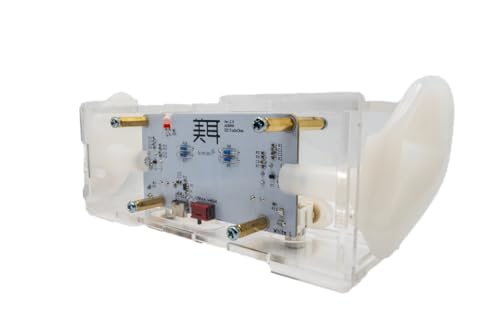
Bit Trade One BIMIMI - Binaural Stereo Microphone Easy BINAURAL Recording/ASMR/Podcast/Recording/Streaming / W7.2×H1.9×D2.6 inches/ADBMM
Binaural stereo mic capturing HRTF — the spatial cues this head-tracked panner approximates via ITD/ILD and quaternion yaw driving StereoPannerNode.
 $34.95Sensor
Adafruit 9-DOF Absolute Orientation IMU Fusion Breakout - BNO055
Bosch BNO055 fusion IMU breakout — quaternion/Euler output for flight, SLAM, and head-tracking labs. Closest verified Amazon listing to BNO085 workflows.
 Sensor
BNO055 9-DOF Breakout Sensor
BNO055 9-DoF fusion IMU breakout for head-tracking and orientation demos.
 $135.00Book
Immersive Sound: The Art and Science of Binaural and Multi-Channel Audio (Audio Engineering Society Presents)
Derives HRTF, ITD = d/c sinθ, and head-tracking compensation — the exact panning law this playground interpolates as you drag yaw.
Prices shown were retrieved from the Amazon Product Advertising API on 8 October 2026 and are indicative only — the price and availability on Amazon at the time of purchase apply.
More gear across every app: the full Gear list →
Two gotchas worth knowing
Listener up vector is not optional
Web Audio defaults the listener up vector to (0,1,0) — Y-up. If you tilt your head (pitch or roll), forward alone is not enough: the up vector must also rotate. Without it, the HRTF panner produces elevation errors. The up vector comes from the +Z column of the same rotation matrix: up = [2(xy − wz), 1 − 2(x² + z²), 2(yz + wx)]. MotionLink sets both fwd and up from the same quaternion.
KEMAR HRTF is not your head
The Web Audio HRTF dataset is based on KEMAR mannequin measurements — a single generic head. Front/back confusions at ±30° are expected because generic HRTFs have blurry pinna notches compared to your personal ears. Professional spatial audio systems use individualized HRTFs measured in an anechoic chamber. For head-tracking demos and music spatialization, the generic set works well enough — the interaural timing cues that dominate azimuth perception are consistent across heads.
Frequently asked questions
Why does pan use sin(yaw) instead of a linear mapping?
The sinusoidal pan law preserves constant power: sin²(yaw) + cos²(yaw) = 1, so the signal power delivered to left + right ears stays constant regardless of pan position. A linear mapping (yaw/90°) would create a 3 dB dip at center because power would be 0.5² + 0.5² = 0.5 instead of sin² + cos² = 1. The sin law is the Web Audio standard for StereoPannerNode and matches human perception of center-panned sources.
What is the difference between StereoPannerNode and PannerNode with HRTF?
StereoPannerNode applies a constant-power gain law to left and right channels — it only models azimuth, with no elevation, no distance, no head shadow. PannerNode with panningModel="HRTF" uses a generic KEMAR head-related transfer function dataset that models interaural time difference (ITD), interaural level difference (ILD), and spectral comb filtering above 4 kHz that your brain uses for front/back and up/down discrimination. For head-tracked audio, HRTF is the production path.
How does MotionLink handle headphone orientation drift?
CoreMotion attitude tracking uses sensor fusion (gyro + accelerometer) and does not reference an absolute heading like a compass. Zero is wherever the headphones were when you called startDeviceMotionUpdates. AirPods can drift 1-2° per minute due to gyro bias integration. MotionLink stores a baseline quaternion on user-triggered recentering and subtracts it from incoming samples. A one-pole lowpass at 8 Hz on yaw further filters jitter without adding perceptible lag.
Why does 180° yaw flip still give pan=0 with sin law?
sin(180°) = 0, so pan returns to center. The listener is facing away from a source that is in front of them — the source is now behind. Simple stereo pan cannot encode front/back because it only controls left/right gain. The HRTF path handles this correctly: when the listener's forward vector rotates 180°, the source moves from +X to −X relative to the listener, and the HRTF applies rear-ear shadowing automatically.
Can I use this same chain on iOS with AVAudioEngine?
Yes. Replace Web Audio PannerNode with AVAudioEnvironmentNode and listener.forwardX/Y/Z with AVAudioMakeAngularOrientation(fwd). The forward vector extraction from the quaternion is identical: fwd = [2(xz+wy), 2(yz−wx), 1−2(x²+y²)]. Source stays at (1,0,0) in world space, listener at origin with orientation from quaternion. The same relative-baseline and smoothing from the playbook above applies on both platforms.
Shareable still
The instrument, captured—not illustrated.
This 16:9 frame is rendered from the real browser instrument above. It is the page's canonical preview for image search, link unfurls, and posts that need to show what the tool actually does.
Download 1280 × 720 JPEG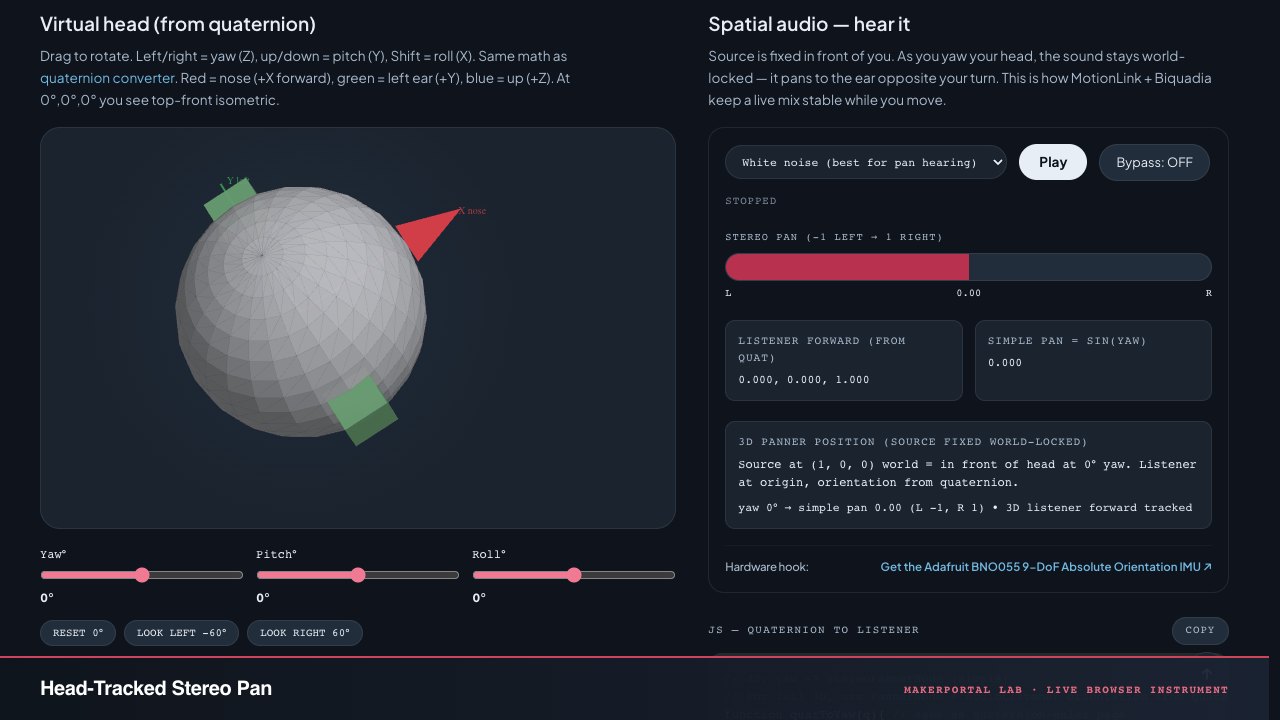
Continue the experiment