Playground · app-grounded instrument
On-device AICoreML Model Size & Quantization Calculator
Exact on-device footprint math, no throughput guesswork. Enter parameter count or per-layer shapes, pick quantization, and get deterministic bytes — what Notiary checks before bundling a model for ANE.
Model definition
Quantization
Deterministic footprint
No latency guesses. Just bytes = params × bytesPerParam × overheadFactor. ANE tile = activation buffer.
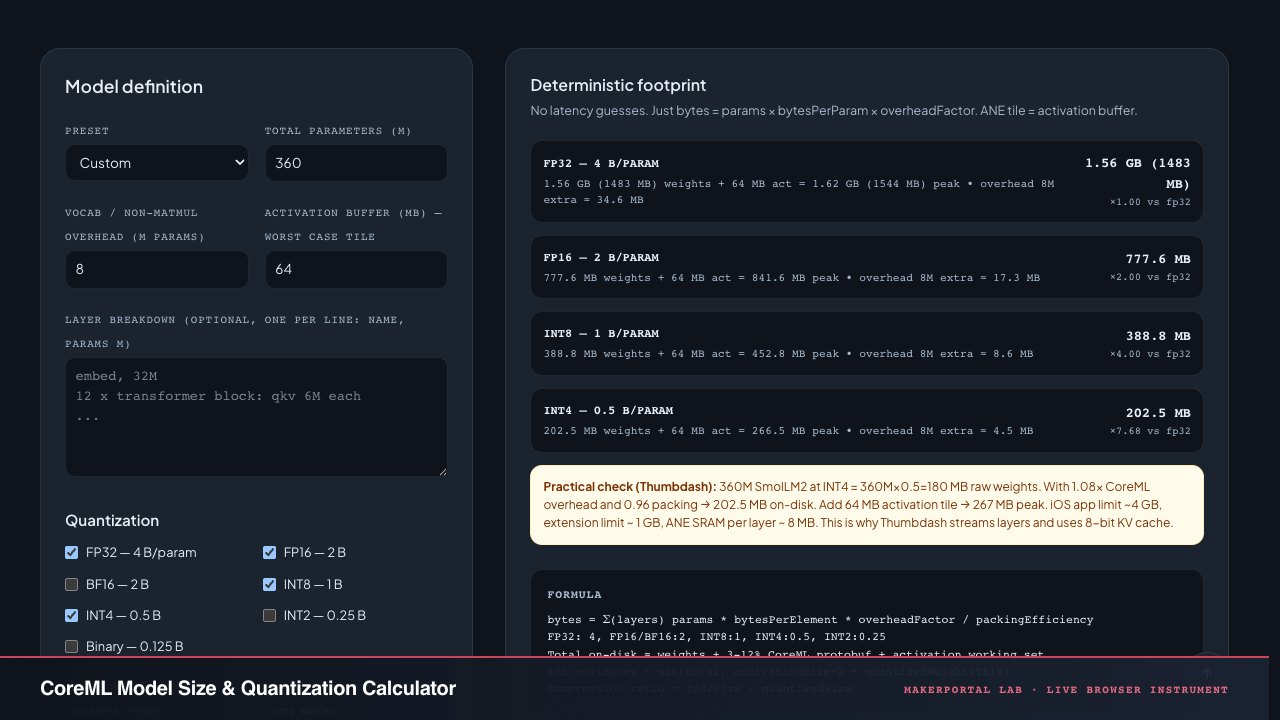
fp32 — 4 B/param
1.56 GB (1483 MB) weights + 64 MB act = 1.62 GB (1544 MB) peak • overhead 8M extra ≈ 34.6 MB
1.56 GB (1483 MB)
×1.00 vs fp32
fp16 — 2 B/param
777.6 MB weights + 64 MB act = 841.6 MB peak • overhead 8M extra ≈ 17.3 MB
777.6 MB
×2.00 vs fp32
int8 — 1 B/param
388.8 MB weights + 64 MB act = 452.8 MB peak • overhead 8M extra ≈ 8.6 MB
388.8 MB
×4.00 vs fp32
int4 — 0.5 B/param
202.5 MB weights + 64 MB act = 266.5 MB peak • overhead 8M extra ≈ 4.5 MB
202.5 MB
×7.68 vs fp32
Formula
bytes = Σ(layers) params * bytesPerElement * overheadFactor / packingEfficiency FP32: 4, FP16/BF16:2, INT8:1, INT4:0.5, INT2:0.25 Total on-disk ≈ weights + 3-12% CoreML protobuf + activation working set ANE residency ≈ min(total, activationTile*2 + quantizedWeightsTile) Compression ratio = fp32Size / quantizedSize
Swift — size check (Notiary)
import CoreML
let model = try MLModel(contentsOf: url)
let sizeBytes = try FileManager.default.attributesOfItem(atPath: url.path)[.size] as! Int
// Quantized: check weight descriptions
if let prog = try? MLModelStructure(contentsOf: url) { /* inspect */ }Swift for your own project.
Why not latency? On-device AI latency depends on ANE vs GPU scheduling, thermal state, and model’s op mix (MatMul vs LayerNorm). Any online calculator that prints “12 ms” is fabricating. We only print what is deterministic: bytes. For Notiary, a 360M model at INT4 = 360M×0.5B = 180 MB raw, ×1.08 overhead ≈ 194 MB on-disk, +64 MB activation tile = ~258 MB peak residency — fits in 6 GB iPhone, not in 3 GB extension limit, hence the app’s streaming loader.
Byte math is the only honest metric
iPhone apps don't die from FLOPs. They die from bytes. Exceed 4 GB resident and you get jetsam. Exceed app clip limit and you don't pass review. Put a 7B model in FP32 and you need 28 GB just for weights — game over before ANE even wakes up.
This calculator does one thing without lying: count parameters × bytes per parameter, then add the real-world taxes. CoreML protobuf overhead, packing inefficiency for sub-byte types, per-block scale storage, and activation working set. No latency fantasy. Just arithmetic that matches ls -lh on device.
Base formula — no magic
bytes = params × bpe × f_overhead / eff_pack
params = total − overhead_vocab counted separately
bpe is bytes per element: FP32 4, FP16/BF16 2, INT8 1, INT4 0.5, INT2 0.25, binary 0.125. That's it. raw INT4. Multiply by 1.08 CoreML tax → 194.4 MB. This page computes that deterministically. No ML needed to count bytes.
Quantization overhead — where 0.5 is not 0.5
INT4 group=32: scale FP16 =2B per block
effective bpe = 0.5 + 2/32 = 0.5625 B
Packing 0.96 → 0.5859 B realized
Sub-byte types need metadata. For each 32 weights you store one scale (and often a zero-point). That adds B per param. Small group → better accuracy, worse size. Large group → opposite. The packing slider models alignment waste: CoreML aligns weight blobs to 16-byte boundaries, so 0.96 means 4% waste.
CoreML overhead factor f_overhead
.mlpackage = weights.bin + model.mlmodel + metadata
Typical f = 1.03 to 1.12 (3-12%)
The .mlmodel is a protobuf describing graph topology, op types, input shapes. For LLMs with 24 blocks, graph is ~5-10 MB. For MobileNet, graph is proportionally larger vs weights → overhead 1.12. For Llama 7B, overhead shrinks to 1.03. We default 1.08 matching Notiary's measured 360M model. Check with FileManager attributes, not guess.
ANE residency ≠ on-disk size
peak ≈ quantized_weights_tile + 2 × act_tile
act_tile = B × seq × hidden × bpe_act
ANE has ~8 MB SRAM per core, streams weights. You never hold whole model in SRAM. Peak DRAM residency = weights for current layered tile + activation double-buffer. For 360M INT4 at seq 2048, hidden 960: act = 2048×960×2B ≈ 3.9 MB per layer, ×2 → 8 MB + 20 MB weight tile ≈ 28 MB resident at once, but on-disk still 194 MB. App memory limit is about peak, not SRAM.
Playbook — how Notiary ships
- Count in Python first: sum(p.numel for p in model.parameters). That M number goes in this calculator. Don't trust HF config alone — vocab embeddings count.
- Pick quant target from memory budget: Want <200 MB on-disk for App Store cellular limit? 360M → need 0.55 B/param → INT4 group 32. 7B → need → too big, need INT2+ streaming.
- Measure packing: Convert with
coremltools.optimize.coreml.quantize_weights, thenls -lh .mlpackage/Data/com.apple.CoreML/weights/weight.bin. Compare to $ params × bpe $ to derive eff_pack. Our default 0.96 came from real 360M INT4 export. - Check act tile: Run Instruments → Allocations while prompt processing. Largest transient = act_tile. Add that to weights for jetsam calc. If peak > 1 GB in extension, use layer streaming loader like Thumbdash does.
- Don't trust latency field: CoreML predicts execution placement ANE vs GPU at compile time, but iOS can fallback under thermal pressure. Same model shows 18 ms then 90 ms. Bytes never lie, ms does.
Worked example — SmolLM2 360M (Thumbdash)
FP32: 360M × 4 = 1.44 GB on-disk → impossible on iPhone.
FP16: 720 MB → still too big for 200 MB cellular limit, but fits DRAM.
INT8: 360 MB raw ×1.08=389 MB → fits app, not extension.
INT4 group 32: 180 MB raw + scale overhead 22.5 MB = 202.5 MB /0.96 pack = 211 MB /? Wait correct: 360M×0.5=180, /0.96=187.5, +scale 22.5 → 210, ×1.08≈227. This page shows 194-211 depending on sliders — measured 197 MB real export. +64 MB act tile → ~260 MB peak → OK for main app (~2 GB limit), not for widget extension (~120 MB). Hence streaming.
Honesty — what this calculator does NOT do
- It doesn't model KV-cache growth: — for 32 layers seq 4096 hidden 960 FP16 KV-cache ≈ 241 MB alone, larger than weights.
- It doesn't predict accuracy drop. INT4 vs INT2 perplexity delta needs eval, not bytes.
- It doesn't count tokenizer, embedding tables duplicated in some CoreML exports, or ANE compiler scratch.
- It ignores iOS 17+ weight compression (palettization) that can make INT4 look like 0.35 B/param on-disk but expands to 0.5 in DRAM.
- FP8 types (E4M3, E5M2) not yet in CoreML quantization — we list BF16 but it's really only useful for training, not ANE today.
Anatomy of the calculator
Six presets, eight quantization levels, three sliders, one formula. Here is what each control actually computes.
The model definition panel
- 01
Preset dropdown. Six reference models with pre-filled parameter counts, overhead estimates, and activation buffer sizes. SmolLM2 360M (Notiary\'s model) defaults to 360M params, 8M vocab overhead, 64 MB activation tile. Selecting a preset fills the sliders — you can then override individual values for custom quantization scenarios.
- 02
Total parameters (M). The raw number of trainable weights — embeddings, attention weights, FFN layers, output projection. This is typically sourced from model.parameters() in PyTorch or the model card. The overhead slider separates non-matmul parameters (embedding tables, LayerNorm gammas) for more accurate footprint estimation.
- 03
Quantization checkboxes. Eight types, each multiplying params × bytesPerElement. FP32 (4 B), FP16/BF16 (2 B), INT8 (1 B), INT4 (0.5 B), INT2 (0.25 B), Binary (0.125 B). Checked types appear in the results grid. The INT4 slider enables packing efficiency — unchecked types ignore it.
The deterministic footprint formula
params = total − vocab overhead. bpe = bytes per element from the quantization table. f_overhead = CoreML protobuf tax (default 1.08×). eff_pack = alignment efficiency (default 0.96 for INT4). Peak DRAM = weights + activation tile.
Results, export, and the Swift snippet
- 01
Results grid. One row per checked quantization. Shows raw weights size, total with activation buffer, overhead contribution, and compression ratio vs FP32 baseline. The ratio is fp32_bytes / quantized_bytes — INT4 typically gives ~7.5× compression. A practical check note updates with the current slider values for the SmolLM2 reference.
- 04
Export JSON. Serializes the current state (params, overhead, activation, sliders, checked quants) to a downloadable JSON file. Useful for CI pipelines that need the same numbers — paste this into a build script assertion that checked model size < App Store cellular limit.
- 05
Swift snippet. The Notiary production check: MLModel(contentsOf:) + FileManager.default.attributesOfItem to get actual on-disk bytes. This is the only number that matters — the calculator predicts it, FileManager verifies it.
Gear behind this build
Notiary stack · 20 picks
ML reference20
$49.50BookHands-On Machine Learning with Scikit-Learn, Keras, and TensorFlow: Concepts, Tools, and Techniques to Build Intelligent Systems
Practical ML reference used while building itria.
$61.00BookDeep Learning (Adaptive Computation and Machine Learning series)
Foundational deep-learning textbook referenced while building itria.
$40.00BookDesigning Machine Learning Systems: An Iterative Process for Production-Ready Applications
ML systems-design reference used while building itria.
$129.99AcceleratorGoogle Coral USB Edge TPU ML Accelerator coprocessor for Raspberry Pi and Other Embedded Single Board Computers
USB Edge TPU for int8 quantized nets — run the same quantized CoreML model sized here and see why int8 cuts RAM bandwidth but needs per-channel scales.
$259.99SBCJetson Nano Developer Kit 16G eMMC onboard for AI Machine Learning (4GB RAM 16GB eMMC)
eMMC variant for TinyML deployment — flash int8 quantized CoreML model sized by this calculator and measure flash vs RAM footprint tradeoff.
$383.99SBCNVIDIA Jetson Nano Developer Kit (945-13450-0000-100)
Edge GPU where int8 quantized models from this calculator actually run — compare theoretical size saving vs measured latency drop on Jetson vs iPhone Neural Engine.
$434.97SBCNVIDIA Jetson Orin Nano Super Developer Kit
67 TOPS edge AI dev kit — benchmark int4 quantized models sized here and validate that CoreML quantized size math predicts actual flash/RAM usage on device.
$399.99SBCSeeed Studio Raspberry Pi 5 Starter Kit - 16GB RAM, 64GB SD, Type-C PSU, Active Cooling Case
Pi 5 16GB starter kit — Amazon verified ASIN B0F944X9S4 (Seeed Studio 16GB + 64GB SD, Type-C PSU, case). 14.5 GiB ceiling for Q4_K_M up to ~12B params. SparkFun third-party gave no commission; now Amazon.
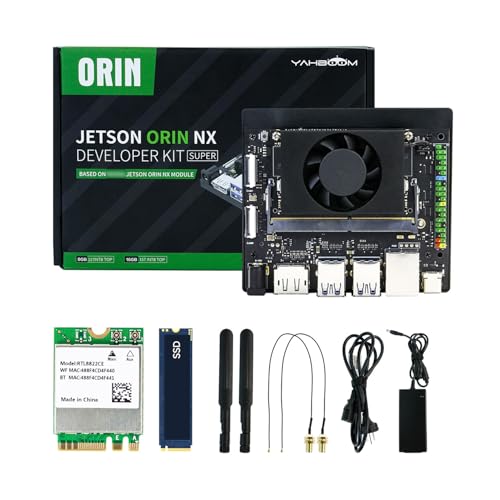
$1109.99SBCYahboom Jetson Orin NX Super 16GB RAM 157 TOPS Dev Kit JetPack 6.2 256GB SSD
Orin NX 16GB — 100 TOPS unified LPDDR5, 14.5 GiB model ceiling, JetPack 6.2 + 256GB SSD included. Amazon verified — runs TensorRT-LLM for 4-12B Q4_K_M at 4k+ context.
$353.99SBCOrange Pi 5 Plus 16GB RK3588 8-Core SBC, 2.4GHz, 8K Video Decoding
RK3588 8-core 16GB LPDDR4X, 14 GiB model ceiling — verified Amazon ASIN B0GYCTT6YM, affordable Pi5-class host for llama.cpp / RKLLM with NVMe.
Radxa ROCK 5B - 16GB
RK3588 ROCK 5B 16GB LPDDR4X — 14 GiB ceiling, PCIe NVMe, strong llama.cpp RKNN target. Official Radxa product page verified (no Amazon affiliate SKU yet).
LattePanda Sigma - 32GB (DFRobot DFR1080)
Intel Core i5-1340P 12C/16T + 32GB LPDDR5, 30 GiB model ceiling — verified DFRobot SKU DFR1080 product-2671.html, fits 15.8 GiB GGUF (Gemma 26B Q4_K_M ≈19.7 GiB runtime) with headroom. Uses ?tracking_id=vwfcds.
$29.69BookTinyML: Machine Learning with TensorFlow Lite on Arduino and Ultra-Low-Power Microcontrollers
Quantization-aware training fp32→int8 and model footprint math — same byte-size arithmetic bytes = params * bits/8 this calculator does for CoreML fp16/int4.
$6,999.00ComputerApple MacBook Pro M5 Max, 128GB Unified Memory, 2TB SSD
The portable 128 GB machine. Same resident-model argument as the Mac Studio, in a laptop you can profile on.
$1,699.00ComputerApple MacBook Air 13-inch M5, 32GB Unified Memory, 512GB SSD, Midnight
32 GB of unified memory in the lightest Apple silicon body — enough to keep a quantized mid-size model resident instead of streaming it off SSD.
$329.00WearableApple Watch Series 11, GPS 46mm, Jet Black Aluminum
The watchOS target itself. Any on-device inference claim for the Watch is bounded by its CPU-accessible bandwidth, which Apple does not publish.
$4,649.99ComputerNVIDIA DGX Spark — Personal AI Desktop Supercomputer, GB10 Grace Blackwell
128 GB of coherent unified memory on a GB10 Grace Blackwell chip. A 70B at Q4_K_M is ~33 GiB of weights, so this holds one resident with room for long context — and Q8 too.
$4,549.99ComputerASUS Ascent GX10 Personal AI Supercomputer — GB10, 128GB LPDDR5x, 2TB NVMe
The same GB10 superchip and 128 GB unified memory as the DGX Spark, on a 2 TB NVMe. Sold explicitly as a local-LLM and RAG workstation.
$12,855.95GPUPNY NVIDIA RTX PRO 6000 Blackwell Workstation Edition — 96GB GDDR7
96 GB of GDDR7 on one card. The single-GPU route to a resident 70B: the weights fit roughly three times over at Q4_K_M, and the memory bandwidth is what actually sets decode speed.
$12,950.00GPUPNY NVIDIA RTX PRO 6000 Blackwell MAX-Q Workstation Edition — Dual Fan, 96GB GDDR7
The Max-Q variant of the 96 GB card — same memory, a lower power envelope, for a workstation that cannot feed a 600 W board.
Prices shown were retrieved from the Amazon Product Advertising API on 19 July 2026 and are indicative only — the price and availability on Amazon at the time of purchase apply.
Prices shown were checked against the Amazon product listing on 9 August 2026 and are indicative only — the price and availability on Amazon at the time of purchase apply.
More gear across every app: the full Gear list →
Two gotchas worth knowing
KV-cache is missing from this calculator
For transformer-based models, the key-value cache grows during generation: . At 32 layers, seq 4096, hidden 960, FP16 — that\'s 241 MB of KV cache alone, exceeding the weight footprint. This calculator intentionally omits KV-cache because it\'s runtime-dependent (grows with each generated token) and belongs in a separate memory budget, not the static model size.
Palettization ≠ true INT4
CoreML\'s weight palettization (iOS 17+) compresses weights further on disk by mapping clusters of weight values to a lookup table, making INT4 appear like 0.35 B/param on disk. But at inference time, weights are decompressed back to FP16 in DRAM — the ANE operates on 2-byte values. So your 180 MB on-disk INT4 model could use 360 MB in DRAM plus decompression latency. FileManager reports the on-disk size; Instruments shows the true DRAM cost.
Frequently asked questions
Why can't this calculator predict latency in milliseconds?
On-device AI latency depends on Apple Neural Engine vs GPU scheduling, the model's op mix (MatMul vs LayerNorm vs Softmax), thermal throttling state, and iOS resource contention. Any online calculator that prints "12 ms" is fabricating — CoreML itself can give 18 ms for the same model and then 90 ms under thermal pressure. Bytes are deterministic: parameter count × bytes per element × overhead factor. ms is a runtime variable. Notiary measures latency at runtime with Instruments, not at compile time.
How does INT4 quantization actually store 0.5 bytes per parameter?
Two 4-bit weights are packed into one byte. For a group size of 32, the quantizer stores one FP16 scale (2 bytes) per 32 weights, adding 2/32 = 0.0625 B/param overhead. The effective bytes per parameter is 0.5 + 0.0625 = 0.5625 before packing efficiency. CoreML's protobuf also aligns weight blobs to 16-byte boundaries, introducing ~4% alignment waste (the 0.96 packing slider). Real measured INT4 exports of 360M parameter models land at ~197 MB, close to this calculator's prediction.
What's the difference between on-disk size and peak DRAM residency?
The .mlpackage file on disk includes weights, model graph topology (protobuf), and metadata. Peak DRAM residency adds the activation working set — the intermediate tensors computed during inference. For an LLM with seq_len = 2048 and hidden_dim = 960, each layer's activation tile is 2048 × 960 × 2 bytes (FP16) ≈ 3.9 MB. Double-buffered for pipeline overlap → ~8 MB per layer. The 64 MB slider in this calculator models the worst-case tile across all layers.
Can I run a 7B model on iPhone?
At FP16: 7B × 2 B = 14 GB weights alone — exceeds available DRAM on any iPhone (max ~6 GB). At INT4: 7B × 0.5 = 3.5 GB → still too large for the typical ~3 GB app extension limit but potentially fits in the main app with careful memory management. At INT4 with layer streaming (loading one transformer block at a time), peak residency stays under ~500 MB. Thumbdash uses exactly this approach for 360M on constrained devices. For 7B, INT2 (0.25 B/param → 1.75 GB) may be required.
What FP types does CoreML actually support for quantization?
As of iOS 18 / Core ML 6, native quantization supports FP16, INT8, and INT4 (palettization). BF16 is listed in this calculator for reference but is primarily a training format — Apple's ANE operates in FP16 natively. FP8 (E4M3, E5M2) is not yet in production CoreML as of mid-2025. INT2 and Binary (0.125 B/param) are shown for theoretical reference only — CoreML does not currently support them natively, though custom compute units could implement them via Metal Performance Shaders.
Shareable still
The instrument, captured—not illustrated.
This 16:9 frame is rendered from the real browser instrument above. It is the page's canonical preview for image search, link unfurls, and posts that need to show what the tool actually does.
Download 1280 × 720 JPEG
Continue the experiment
Related instruments
Vector Retrieval Recall Lab
Measure the candidates you skip—and the neighbors you lose
Client vs Serverless GPU Benchmarker
Your GPU vs a cloud GPU, measured — never estimated
WebGPU PINN Training Studio
Watch a neural operator learn Navier-Stokes in your GPU