Playground · app-grounded instrument
On-device AILLM VRAM & KV-Cache Footprint Calculator
Exact memory math for open LLMs (DeepSeek-R1, Llama 3.3, Qwen 2.5, Mistral). Calculate weight sizes, KV-cache scaling up to 128K context, the runtime reserve, and hardware fit across Apple Silicon, RTX GPUs, and Jetson dev kits.
Already solved for 68 models and 22 accelerators. The calculator below runs the same solver on the same model configs — to see every pairing at once, browse the fit matrix.
Model & Architecture Configuration
Deterministic Math70.6B parameters · 80 layers × 8 KV heads × 128 dims · trained context 131,072 · Q4_K_M weights: measured file.
Memory Footprint Breakdown
56.1 GiB VRAMHardware Target Compatibility Matrix
Anatomy of LLM Memory Allocation
Running an open LLM on consumer GPUs or Apple Silicon requires partitioning memory across three distinct structures:
Quantized Weight Tensor
The model parameters stored on disk. Quantization packs two-byte FP16 weights down to Q4_K_M (4.83 bits nominal, 0.60 B/param) or Q8_0 (8.5 bits, 1.06 B/param). Where a real GGUF file is published, its measured size is used instead — small models run well above the nominal figure. Stays resident in VRAM/Unified RAM continuously.
Key-Value Attention Cache
Stores intermediate key and value states per layer for every prompt token to avoid re-computing attention during generation. Grows linearly with context length and batch size.
CUDA/Metal Runtime Context
GPU driver context buffers, scratch spaces for FlashAttention, activation tensors — and on a desktop, the display and the OS. This calculator holds back 8% of a dedicated card and 25% of unified memory for them. That is an assumption, not a measurement: a headless server card gives back more, a card driving two displays less.
Gear & Hardware Picks for Local LLMs
Tested studio gear for running large models on-device and high-throughput inference.
 $4,299.00Computer
Apple Mac Studio, M4 Max 16-Core CPU / 40-Core GPU, 64GB Unified Memory, 2TB SSD
Recommended studio reference hardware for heavy on-device ML and local LLM inference.
 $2,299.00Computer
Apple 2026 Mac Studio Desktop Computer M5 Max chip
18-core CPU, 32-core GPU, 36GB unified memory, 512GB storage, 10Gb Ethernet — the entry point into the same on-device ML and local-LLM workflow as the M4 Max box.
 $51.51Book
Deep Learning (Adaptive Computation and Machine Learning series)
Foundational deep-learning textbook referenced while building itria.
 $40.00Book
Designing Machine Learning Systems: An Iterative Process for Production-Ready Applications
ML systems-design reference used while building itria.
 $49.50Book
Hands-On Machine Learning with Scikit-Learn, Keras, and TensorFlow: Concepts, Tools, and Techniques to Build Intelligent Systems
Practical ML reference used while building itria.
 Accelerator
Google Coral USB Edge TPU ML Accelerator coprocessor for Raspberry Pi and Other Embedded Single Board Computers
USB Edge TPU for int8 quantized nets — run the same quantized CoreML model sized here and see why int8 cuts RAM bandwidth but needs per-channel scales.
 $64.37Book
Programming Massively Parallel Processors: A Hands-on Approach
CUDA/GPU parallel programming text for WebGPU PINN and edge GPU workloads.
 SBC
SBCJetson Nano Developer Kit 16G eMMC onboard for AI Machine Learning (4GB RAM 16GB eMMC)
eMMC variant for TinyML deployment — flash int8 quantized CoreML model sized by this calculator and measure flash vs RAM footprint tradeoff.
 SBC
SBCNVIDIA Jetson Nano Developer Kit (945-13450-0000-100)
Edge GPU where int8 quantized models from this calculator actually run — compare theoretical size saving vs measured latency drop on Jetson vs iPhone Neural Engine.
 $399.00SBC
NVIDIA Jetson Orin Nano Super Developer Kit
67 TOPS edge AI dev kit — benchmark int4 quantized models sized here and validate that CoreML quantized size math predicts actual flash/RAM usage on device.
 Storage
Sandisk 1TB Extreme Portable SSD, Up to 2000MB/s Transfer Speeds-New Model
Portable SSD used for studio project storage and backups.
 $259.95SBC
CanaKit Raspberry Pi 5 Starter Kit PRO - Turbine Black (128GB Edition) (8GB RAM)
Flagship Pi 5 8GB board — Amazon verified ASIN B0CK2FCG1K (via DuckDuckGo Amazon search). SparkFun third-party gave no commission; now Amazon affiliate.
 SBC
SBCSeeed Studio Raspberry Pi 5 Starter Kit - 16GB RAM, 64GBGB Micro SD Card Pre-Loaded 64-bit OS, Type-C Power Supply, Active Cooling Case for Edge AI, Docker & Pro Workstation
Pi 5 16GB starter kit — Amazon verified ASIN B0F944X9S4 (Seeed Studio 16GB + 64GB SD, Type-C PSU, case). 14.5 GiB ceiling for Q4_K_M up to ~12B params. SparkFun third-party gave no commission; now Amazon.
 SBC
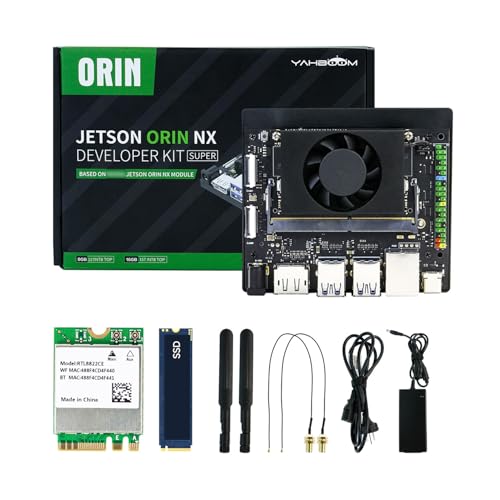
SBCYahboom Jetson Orin NX Super 16GB RAM 157 Tops Developer Kit Ubuntu Jetpack6.2 with 256GB SSD, Power Supply, for AI Large Model (Orin NX 16GB Developer Kit)
Orin NX 16GB — 100 TOPS unified LPDDR5, 14.5 GiB model ceiling, JetPack 6.2 + 256GB SSD included. Amazon verified — runs TensorRT-LLM for 4-12B Q4_K_M at 4k+ context.
 $353.99SBC
Orange Pi 5 Plus 16GB Rockchip RK3588 8 Core 64 Bit Single Board Computer, 2.4GHz Frequency 8K Video Decoding Open Source Development Board Run Orange Pi OS, Android, Debian, Ubuntu (5 Plus 16G)
RK3588 8-core 16GB LPDDR4X, 14 GiB model ceiling — verified Amazon ASIN B0GYCTT6YM, affordable Pi5-class host for llama.cpp / RKLLM with NVMe.
Radxa ROCK 5B - 16GB
RK3588 ROCK 5B 16GB LPDDR4X — 14 GiB ceiling, PCIe NVMe, strong llama.cpp RKNN target. Official Radxa product page verified (no Amazon affiliate SKU yet).
 $729SBC
LattePanda Sigma - 32GB (DFRobot DFR1080)
Intel Core i5-1340P 12C/16T + 32GB LPDDR5, 30 GiB model ceiling — verified DFRobot SKU DFR1080 product-2671.html, fits 15.8 GiB GGUF (Gemma 26B Q4_K_M ≈19.7 GiB runtime) with headroom. Uses ?tracking_id=vwfcds.
 $28.58Book
TinyML: Machine Learning with TensorFlow Lite on Arduino and Ultra-Low-Power Microcontrollers
Quantization-aware training fp32→int8 and model footprint math — same byte-size arithmetic bytes = params * bits/8 this calculator does for CoreML fp16/int4.
 $6,999.00Computer
Apple MacBook Pro Laptop with M5 Max, 18‑core CPU, 40‑core GPU: Standard 16.2-inch Display, 128GB Unified Memory, 2TB SSD Storage; Space Black
The portable 128 GB machine. Same resident-model argument as the Mac Studio, in a laptop you can profile on.
 $1,599.55Computer
13-inch MacBook Air (M5): 32GB Memory, 512GB SSD - Midnight
32 GB of unified memory in the lightest Apple silicon body — enough to keep a quantized mid-size model resident instead of streaming it off SSD.
![Apple Watch Series 11 [GPS 46mm] Smartwatch with Jet Black Aluminum Case with Black Sport Band - M/L. Sleep Score, Fitness Tracker, Health Monitoring, Always-On Display, Water Resistant](https://m.media-amazon.com/images/I/416RQ0rtsUL._SL500_.jpg) $360.05Wearable
$360.05WearableApple Watch Series 11 [GPS 46mm] Smartwatch with Jet Black Aluminum Case with Black Sport Band - M/L. Sleep Score, Fitness Tracker, Health Monitoring, Always-On Display, Water Resistant
The watchOS target itself. Any on-device inference claim for the Watch is bounded by its CPU-accessible bandwidth, which Apple does not publish.
 $1,179.00Phone
Apple iPhone 17 Pro, US Version, 512GB, eSIM, Silver- Unlocked (Renewed Premium)
The outgoing Pro generation, still the reference iOS device for on-device inference work here. Amazon Renewed unit — Apple no longer sells this model new, which is the same fact that retires its specification page (D-415).
 $4,649.99Computer
NVIDIA DGX Spark™ - Personal AI Desktop Supercomputer – Desktop GB10 Grace Blackwell Chip
128 GB of coherent unified memory on a GB10 Grace Blackwell chip. A 70B at Q4_K_M is ~33 GiB of weights, so this holds one resident with room for long context — and Q8 too.
 $4,549.99Computer
ASUS Ascent GX10 Personal AI Supercomputer, NVIDIA GB10 Grace Blackwell Superchip, 128GB LPDDR5x Unified Memory, 2TB NVMe SSD, DGX OS, Wi-Fi 7, 10GbE, AI Workstation for Local LLM and RAG
The same GB10 superchip and 128 GB unified memory as the DGX Spark, on a 2 TB NVMe. Sold explicitly as a local-LLM and RAG workstation.
 $17,986.96GPU
PNY VCNRTXPRO6000B-PB RTX PRO 6000 96GB GDDR7 Graphic Card
96 GB of GDDR7 on one card. The single-GPU route to a resident 70B: the weights fit roughly three times over at Q4_K_M, and the memory bandwidth is what actually sets decode speed.
 $12,950.00GPU
PNY NVIDIA RTX PRO 6000 Blackwell MAX-Q Workstation Edition Dual Fan 96GB GDDR7
The Max-Q variant of the 96 GB card — same memory, a lower power envelope, for a workstation that cannot feed a 600 W board.
 $4,499.99GPU
ASUS ROG Strix GeForce RTX 4090 OC Edition Gaming Graphics Card (PCIe 4.0, 24GB GDDR6X, HDMI 2.1a, DisplayPort 1.4a), 3 Year Warranty
24 GB of GDDR6X on a 384-bit bus (1,008 GB/s memory bandwidth) with Ada Lovelace Tensor Cores. The standard local workstation GPU for running quantized 70B LLMs, fine-tuning neural audio codecs, and accelerating speech synthesis pipelines.
 $579.00Computer
Apple 2024 Mac mini Desktop Computer with M4 chip with 10‑core CPU and 10‑core GPU: Built for Apple Intelligence, 16GB Unified Memory, 256GB SSD Storage, Gigabit Ethernet. Works with iPhone/iPad
Apple silicon M4 chip with 10-core CPU, 10-core GPU, and 16-core Neural Engine with 120 GB/s unified memory bandwidth. Compact workstation for on-device Apple Intelligence, CoreML model quantization, and local neural speech inference.
Prices shown were retrieved from the Amazon Product Advertising API on 8 October 2026 and are indicative only — the price and availability on Amazon at the time of purchase apply.
Prices shown were each checked against the Amazon product listing between 8 August 2026 and 17 September 2026 and are indicative only — the price and availability on Amazon at the time of purchase apply.
Build this lab
Local vs cloud inference bench
Jetson Orin Nano for local GPU inference + Pi 5 as an offload gateway — reproduce the client-vs-serverless tradeoff on real hardware before you commit to a cloud GPU bill.
- $399
- $260
- —
- —
- $40
Prices shown were retrieved from the Amazon Product Advertising API on 8 October 2026 and are indicative only — the price and availability on Amazon at the time of purchase apply.
Prices shown were each checked against the Amazon product listing between 8 August 2026 and 17 September 2026 and are indicative only — the price and availability on Amazon at the time of purchase apply.
Estimated total
$659
Prices from Amazon catalog cache · may change
The Mathematics of Memory & Bandwidth
The card memory M_card a configuration needs is the weights plus the KV cache, divided by the share of the card a runtime can allocate:
W_file is the byte size of the published GGUF file where one exists, and parameters × bits per weight ÷ 8 where none does. Sliding-window layers count at most their window in the cache term. f_usable is 0.92 on a dedicated card and 0.75 on unified memory — the reserve row above is the difference.
Autoregressive decoding reads the weights it routes through once per token, plus one pass over the KV cache, so its speed T_gen (tokens/sec) is bounded by bandwidth divided by bytes read per token:
a is the share of weights read per token: 1 for a dense model, the routed-expert share for a mixture of experts. It is a ceiling no runtime exceeds, and the results panel prints both terms of the division beside it.
Inference Startup & Allocation Command
Copyable startup template for vLLM / llama.cpp with exact memory ceilings.
# Python / vLLM / llama.cpp startup script generator
# Run with estimated memory ceiling
python3 -m vllm.entrypoints.openai.api_server \
  --model Qwen/Qwen2.5-72B-Instruct-GGUF \
  --gpu-memory-utilization 0.90 \
  --max-model-len 32768 \
  --kv-cache-dtype fp8
Export · Soft gate
Export vLLM & llama.cpp Benchmark Config Script
Free watermarked file instantly. Unlock clean export via email — soft gate, no hard paywall. We store unlock in localStorage per sim.
File · llm-vram-kvcache-calculator.txt
llm-vram-kvcache-calculator.txttext/plain+ watermark line on free pathFree download adds a small footer:
# Export from makerportal.ai — free watermarked build. Unlock c…Clean export removes footer. Both are generated fresh from your current sim tuning.
Privacy: email stays in your browser localStorage (mp_export_email_llm-vram-kvcache-calculator) + unlock flag (mp_export_unlock_llm-vram-kvcache-calculator). If Buttondown username is configured, we also POST to Buttondown (privacy-first mode, no tracking pixels per D-014). See privacy → affiliates & email.
Unlock clean export
Soft gate — no hard paywall, no Clerk. Email stays local unless you explicitly check the newsletter box. Unsubscribe anytime. RSS at /rss.xml.
✓ Lab Pro — clean export on every lab
Your licence unlocks this and every other gated simulator, so there is nothing to enter here. Manage or sign out on the shop page.
✓ Unlocked — clean exports enabled
Stored in mp_export_unlock_llm-vram-kvcache-calculator. Clean file omits watermark. Re-lock via browser devtools → localStorage.
Frequently Asked Questions
How is total LLM VRAM requirement calculated?↓
The weights and the KV cache together have to fit in the memory a runtime can actually allocate. Weights are the byte size of the published GGUF file wherever one exists, and parameters × bits per weight ÷ 8 where none does. The KV cache is 2 × layers × KV heads × head dim × context × batch × bytes per element, with any sliding-window layer capped at its window. This calculator — like the /lab/llm-vram fit map, which shares its solver — assumes 92% of a dedicated card and 75% of unified memory is allocatable, so the card you need is (weights + KV cache) ÷ that fraction. On Apple Silicon that pool is system RAM shared with macOS.
What is the KV-Cache memory impact at 128K context lengths?↓
At 131,072 tokens the KV cache is as large as the weights. Llama 3.3 70B Instruct keeps 40.0 GiB of FP16 cache for one request at that length — 1.01× its 39.6 GiB Q4_K_M weight file. An FP8 cache halves that to 20.0 GiB and a 4-bit cache quarters it to 10.0 GiB.
Why does Apple Silicon (M1–M4 Ultra) perform so well on large models?↓
Capacity, not speed. Apple M3 Ultra (512GB) moves 819 GB/s, less than the 1,792 GB/s of GeForce RTX 5090, but even at the 75% of unified memory this calculator assumes the GPU can use, it holds 384.0 GiB against 29.4 GiB on the 5090. Llama 3.3 70B Instruct's 131.4 GiB FP16 checkpoint fits there with room for 131,072 tokens of context, at a ceiling of 5.7 tok/s; on the 5090 even its 39.6 GiB Q4_K_M file does not fit.
What token generation speed (tokens/sec) can I expect?↓
Decoding is memory-bound: each token reads the weights it routes through once, plus one pass over the KV cache, so the ceiling is memory bandwidth divided by bytes read per token — not by the weight file alone. Llama 3.3 70B Instruct at Q4_K_M on Apple M4 Max (128GB) reads 45.20 GB per token at 8K context (a 42.52 GB weight file plus 2.68 GB of cache), so 546 GB/s gives a ceiling of 12.1 tok/s per stream. A mixture-of-experts model reads only its routed share of the weights. No runtime beats the ceiling, and a real one typically reaches 60–80% of it.