# Calibrated Multichannel & Binaural Audio Recording on iPhone

Class-compliant multichannel USB audio capture, a loaded 1 V / 103 dB SPL nominal reference at 1 kHz, and binaural recording analyzed on iPhone.

Canonical page: https://makerportal.ai/blog/binaural-head-headphone-measurement
Author: Joshua Hrisko, Principal Engineer — MakerPortal
Published: 2026-08-09
Section: Hardware build / Measurement · 11 min read
Tags: biquadia, audio, measurement, hardware

---

Commercial head-and-torso simulators (HATS) — the mannequins behind many headphone-review charts — cost as much as a car. This build is a practical binaural-dummy-head alternative: a [SR3D® Dummy Head MKIII](https://sr3d.co.uk/products/sr3d-dummy-head-mkiii) with microphones in its ears, a [Behringer UMC1820](https://www.amazon.com/dp/B01EXI8Y9S?tag=engineersport-20) class-compliant interface, the [Sennheiser HD 650](https://www.amazon.com/dp/B00018MSNI?tag=engineersport-20) under test, and a true-RMS multimeter whose AC-voltage bandwidth covers 1 kHz (the [Fluke 87V](https://www.amazon.com/dp/B0002YFD1K?tag=engineersport-20) is one suitable option). The electrically referenced 1 kHz calibration, THD analysis, and level display run entirely on an iPhone in [Biquadia's](https://biquadia.makerportal.ai/) Measure lab.

The anchor is simple: Sennheiser specifies the HD 650's nominal output as **103 dB SPL at 1 kHz for 1.00 V RMS**. Measuring that voltage across the loaded headphone terminals gives this particular capture chain a repeatable reference. It does **not** prove that this particular driver, seal, and ear geometry produce exactly 103 dB; those factors set the method's absolute uncertainty.

## The gear

| Item | Role in this build |
|---|---|
| [SR3D® Dummy Head MKIII](https://sr3d.co.uk/products/sr3d-dummy-head-mkiii) | A binaural head with silicone pinnae and a Primo EM272 electret capsule seated in each ear canal. The ears are the measurement microphones. |
| [Behringer UMC1820](https://www.amazon.com/dp/B01EXI8Y9S?tag=engineersport-20) | Class-compliant USB interface — this direct 48 kHz connection exposes 10 inputs and 12 outputs to iOS with no vendor driver. It drives the headphones and captures both ears simultaneously. |
| [Sennheiser HD 650](https://www.amazon.com/dp/B00018MSNI?tag=engineersport-20) ([official specifications PDF](https://cdn.sennheiser-hearing.com/product-documents/product-downloads/hd-650/safety_instruction/Safety_Guide_HD_650.pdf)) | The headphone under test: nominally 300 Ω and 103 dB SPL at 1 kHz for 1 V RMS. The same specification appears on printed page 5 of this [Sennheiser HD 650 manual mirror](https://www.bhphotovideo.com/lit_files/96698.pdf). |
| [Fluke 87V True-RMS Multimeter](https://www.amazon.com/dp/B0002YFD1K?tag=engineersport-20) | A suitable high-end meter for the electrical reference. Use a meter with documented AC-voltage accuracy at 1 kHz; true-RMS capability alone does not guarantee enough bandwidth. Expect ~1.00 V for the nominal 103 dB reference or ~0.27 V for 91.6 dB. |
| [HOSONGIN 1/4″ TRS Y-Splitter Cable](https://www.amazon.com/dp/B083XSGNS8?tag=engineersport-20) | Lets the meter read the headphone terminals while the HD 650 stays plugged in and on the head — the voltage under load is the one that matters. |
| [Biquadia — Audio DSP Lab](https://biquadia.makerportal.ai/) | Calibration wizard, dual-ear level monitoring, and calibrated SPL meter — 100% on-device on iPhone. |

## Why a dummy head

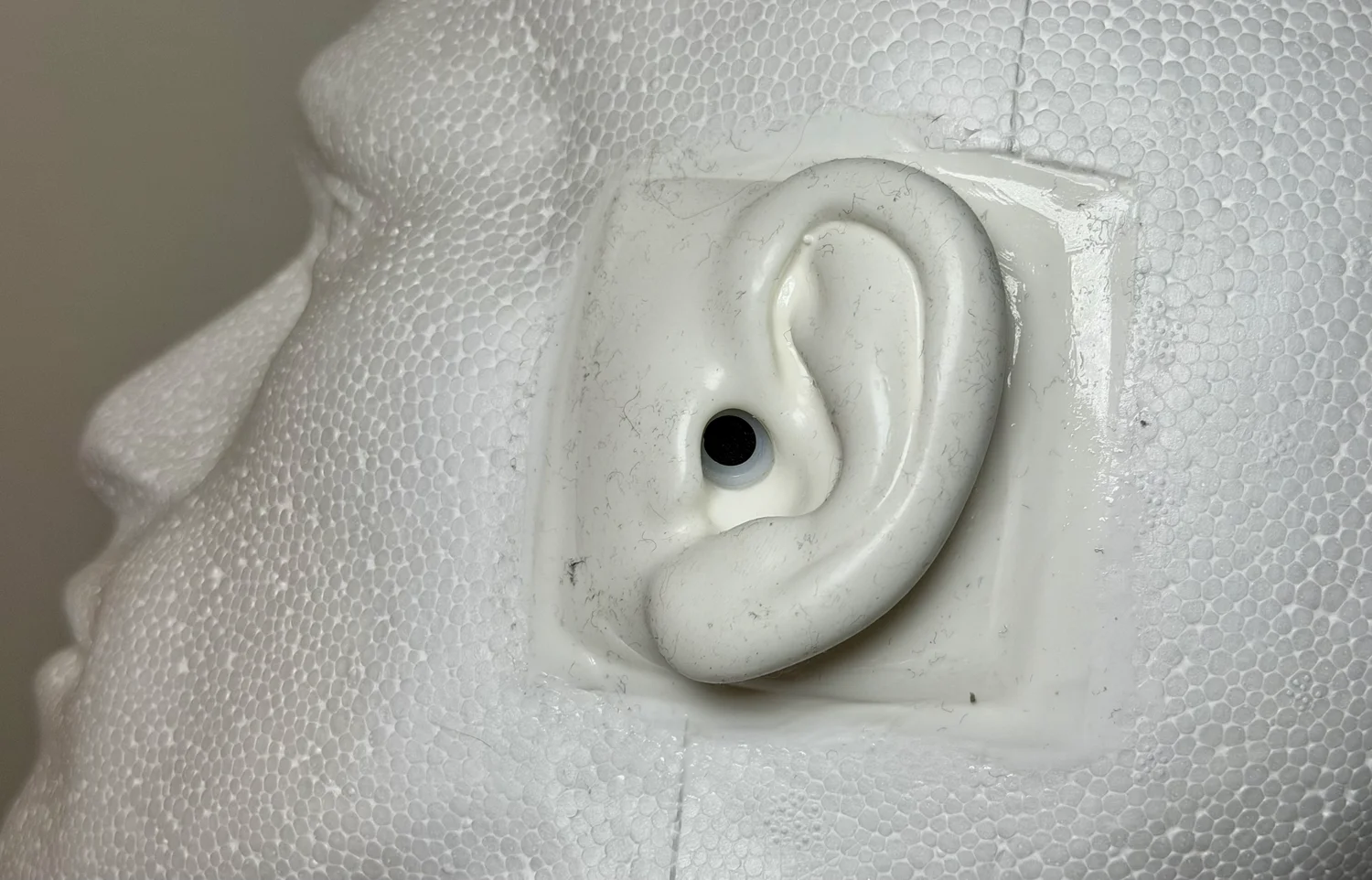
You can't measure a headphone by pointing a microphone at it. A headphone's response only exists *against an ear*: the pad seal sets the bass, the pinna and ear canal impose resonances worth 10–15 dB in the treble, and the left and right cups seal differently on any real geometry. A binaural head reproduces that acoustic load — which is why lab measurements use ear simulators, and why this rig puts a capsule at the entrance of each silicone ear canal rather than on a mic stand.

The SR3D is a binaural dummy head, not a standardized HATS or an IEC ear simulator. That distinction matters: it preserves a realistic, repeatable fixture for this head and these pads, but it does not make its absolute response interchangeable with an industry-standard coupler.

<figure>
  <img src="/images/blog/binaural-head-headphone-measurement/p2-head-ear-closeup.webp" width="1500" height="962" alt="Close-up of the SR3D dummy head's silicone ear with the HD 650 earcup lifted away, showing the Primo EM272 electret capsule seated at the ear canal entrance" loading="lazy">
  <figcaption>The measurement point: a Primo EM272 electret capsule seated at the ear canal entrance, behind a silicone pinna. Everything the headphone does to the sound on the way in — pad seal, cup volume, pinna interaction — is part of what gets measured, exactly as it should be.</figcaption>
</figure>

The consequence worth internalizing: **the two ears are genuinely different instruments.** Different pinna castings, different capsules, different seal. Biquadia therefore runs a completely independent analyzer per ear and never mixes them to mono — summing two coherent-but-different responses would comb-filter the result and invent nulls present in neither ear. Every result in this post is a pair.

## Wiring the chain (and an iOS gotcha)

<div class="my-8 overflow-hidden rounded-[20px] bg-zinc-950 shadow-[0_20px_50px_-22px_rgba(15,23,42,0.6)]">
  <div class="border-b border-white/10 bg-gradient-to-b from-white/5 to-transparent px-5 py-5 sm:px-7 sm:py-6">
    <div class="flex items-center gap-2.5"><span class="h-px w-7 bg-gradient-to-r from-cyan-400 to-purple-400/50"></span><span class="font-mono text-[9px] font-bold uppercase tracking-[0.3em] text-zinc-500">Signal chain</span></div>
    <div class="mt-2.5 bg-gradient-to-r from-white via-zinc-200 to-zinc-400 bg-clip-text text-[20px] font-semibold leading-tight tracking-tight text-transparent sm:text-[23px]">Four-Domain Measurement Architecture</div>
    <div class="mt-2 max-w-[66ch] text-[13px] leading-relaxed text-zinc-400"><span class="hidden sm:inline">Playback descends the left rail, couples acoustically at the head, and the capture return climbs the right rail.</span><span class="sm:hidden">Playback runs down the outbound path, couples acoustically at the head, and the capture return climbs back to the analyzer.</span> The meter only observes.</div>
  </div>
  <div class="px-5 py-5 sm:px-7 sm:py-6">
    <div class="grid grid-cols-1 gap-3 sm:grid-cols-2">
      <div class="rounded-lg bg-white/5 px-3 py-2.5">
        <div class="flex items-center gap-2"><span class="text-[9px] leading-none text-cyan-400">▼</span><span class="font-mono text-[9px] font-bold uppercase tracking-[0.2em] text-cyan-300">Playback</span><span class="h-px flex-1 bg-gradient-to-r from-cyan-400/40 to-transparent"></span></div>
        <div class="mt-1.5 font-mono text-[10px] leading-relaxed text-zinc-400">Generator → USB-C → DAC / amp → splitter → HD 650</div>
      </div>
      <div class="rounded-lg bg-white/5 px-3 py-2.5">
        <div class="flex items-center gap-2"><span class="h-px flex-1 bg-gradient-to-l from-purple-400/40 to-transparent"></span><span class="font-mono text-[9px] font-bold uppercase tracking-[0.2em] text-purple-300">Capture</span><span class="text-[9px] leading-none text-purple-400">▲</span></div>
        <div class="mt-1.5 font-mono text-[10px] leading-relaxed text-zinc-400 sm:text-right">SR3D ears → mic pre / ADC → USB-C → analyzer</div>
      </div>
    </div>
    <div class="relative mt-5 px-4">
      <span aria-hidden="true" class="pointer-events-none absolute inset-y-3 left-0 w-px bg-gradient-to-b from-cyan-400/70 via-amber-400/70 to-purple-400/70"></span>
      <span aria-hidden="true" class="pointer-events-none absolute inset-y-3 right-0 hidden w-px bg-gradient-to-b from-cyan-400/70 via-amber-400/70 to-purple-400/70 sm:block"></span>
      <div class="relative flex flex-wrap items-center gap-x-2.5 gap-y-1">
        <span aria-hidden="true" class="absolute -left-4 top-1/2 h-1.5 w-1.5 -translate-x-1/2 -translate-y-1/2 rounded-full bg-cyan-400 shadow-[0_0_0_3px_#09090b]"></span>
        <span aria-hidden="true" class="absolute -right-4 top-1/2 hidden h-1.5 w-1.5 translate-x-1/2 -translate-y-1/2 rounded-full bg-cyan-400 shadow-[0_0_0_3px_#09090b] sm:block"></span>
        <span class="font-mono text-[10px] font-bold text-cyan-400/70">01</span><span class="text-[13px] leading-none">📱</span><span class="text-[14px] font-semibold tracking-tight text-zinc-50">iOS Digital</span><span class="hidden h-px flex-1 bg-gradient-to-r from-cyan-400/30 to-transparent sm:block"></span><span class="font-mono text-[9px] text-zinc-500">24-bit · 48 kHz LPCM</span><span class="rounded bg-cyan-400/10 px-1.5 py-0.5 font-mono text-[9px] font-bold tracking-[0.06em] text-cyan-300">CoreAudio</span>
      </div>
      <div class="mt-2.5 grid grid-cols-1 gap-3 sm:grid-cols-2">
        <div class="rounded-lg bg-zinc-900 px-3.5 py-2.5 ring-1 ring-white/5"><div class="text-[13px] font-medium leading-snug text-zinc-100">Biquadia Generator</div><div class="mt-1 font-mono text-[10px] text-cyan-300/80">1 kHz tone · dBFS</div></div>
        <div class="rounded-lg bg-zinc-900 px-3.5 py-2.5 ring-1 ring-white/5"><div class="text-[13px] font-medium leading-snug text-zinc-100">Dual-Channel Engine</div><div class="mt-1 font-mono text-[10px] text-cyan-300/80">Independent L / R analyzer</div></div>
      </div>
      <div class="relative flex flex-wrap items-center justify-between gap-x-4 gap-y-1 py-3">
        <span aria-hidden="true" class="absolute -left-4 top-1/2 -translate-x-1/2 -translate-y-1/2 bg-zinc-950 px-px text-[9px] leading-none text-amber-400">▼</span>
        <span class="font-mono text-[9px] uppercase tracking-[0.16em] text-zinc-500">USB-C · class-compliant out</span>
        <span class="font-mono text-[9px] uppercase tracking-[0.16em] text-zinc-500 sm:text-right">USB-C · capture return</span>
        <span aria-hidden="true" class="absolute -right-4 top-1/2 hidden translate-x-1/2 -translate-y-1/2 bg-zinc-950 px-px text-[9px] leading-none text-cyan-400 sm:block">▲</span>
      </div>
      <div class="relative flex flex-wrap items-center gap-x-2.5 gap-y-1">
        <span aria-hidden="true" class="absolute -left-4 top-1/2 h-1.5 w-1.5 -translate-x-1/2 -translate-y-1/2 rounded-full bg-amber-400 shadow-[0_0_0_3px_#09090b]"></span>
        <span aria-hidden="true" class="absolute -right-4 top-1/2 hidden h-1.5 w-1.5 translate-x-1/2 -translate-y-1/2 rounded-full bg-amber-400 shadow-[0_0_0_3px_#09090b] sm:block"></span>
        <span class="font-mono text-[10px] font-bold text-amber-400/70">02</span><span class="text-[13px] leading-none">🎛️</span><span class="text-[14px] font-semibold tracking-tight text-zinc-50">Audio Interface</span><span class="hidden h-px flex-1 bg-gradient-to-r from-amber-400/30 to-transparent sm:block"></span><span class="font-mono text-[9px] text-zinc-500">Behringer UMC1820</span><span class="rounded bg-amber-400/10 px-1.5 py-0.5 font-mono text-[9px] font-bold tracking-[0.06em] text-amber-300">USB Class 2</span>
      </div>
      <div class="mt-2.5 grid grid-cols-1 gap-3 sm:grid-cols-2">
        <div class="rounded-lg bg-zinc-900 px-3.5 py-2.5 ring-1 ring-white/5"><div class="text-[13px] font-medium leading-snug text-zinc-100">UMC1820 DAC + Phones Amp</div><div class="mt-1 font-mono text-[10px] text-amber-300/80">Low Z-out · ~10 Ω</div></div>
        <div class="rounded-lg bg-zinc-900 px-3.5 py-2.5 ring-1 ring-white/5"><div class="text-[13px] font-medium leading-snug text-zinc-100">Mic Preamps + ADC</div><div class="mt-1 font-mono text-[10px] text-amber-300/80">Fixed gain · Ch 1 &amp; 2</div></div>
      </div>
      <div class="relative flex flex-wrap items-center justify-between gap-x-4 gap-y-1 py-3">
        <span aria-hidden="true" class="absolute -left-4 top-1/2 -translate-x-1/2 -translate-y-1/2 bg-zinc-950 px-px text-[9px] leading-none text-purple-400">▼</span>
        <span class="font-mono text-[9px] uppercase tracking-[0.16em] text-zinc-500">Main phones out · 1/4″ TRS</span>
        <span class="font-mono text-[9px] uppercase tracking-[0.16em] text-zinc-500 sm:text-right">Ear mics · inputs 1 &amp; 2</span>
        <span aria-hidden="true" class="absolute -right-4 top-1/2 hidden translate-x-1/2 -translate-y-1/2 bg-zinc-950 px-px text-[9px] leading-none text-amber-400 sm:block">▲</span>
      </div>
      <div class="relative rounded-xl border border-dashed border-emerald-400/40 bg-emerald-400/5 p-3.5 sm:ml-8 sm:p-4">
        <span aria-hidden="true" class="absolute -left-12 top-6 hidden h-0 w-12 border-t border-dashed border-emerald-400/50 sm:block"></span>
        <span aria-hidden="true" class="absolute -left-12 top-6 hidden h-1.5 w-1.5 -translate-x-1/2 -translate-y-1/2 rotate-45 bg-emerald-400 shadow-[0_0_0_3px_#09090b] sm:block"></span>
        <div class="flex flex-wrap items-center gap-x-2.5 gap-y-1"><span class="font-mono text-[10px] font-bold text-emerald-400/70">03</span><span class="text-[13px] leading-none">⚡</span><span class="text-[14px] font-semibold tracking-tight text-zinc-50">Electrical Reference</span><span class="rounded bg-emerald-400/10 px-1.5 py-0.5 font-mono text-[9px] font-bold tracking-[0.06em] text-emerald-300">AC RMS</span><span class="hidden h-px flex-1 bg-gradient-to-r from-emerald-400/30 to-transparent sm:block"></span><span class="font-mono text-[9px] uppercase tracking-[0.16em] text-emerald-300/70">⊥ Observer · not in the signal path</span></div>
        <div class="mt-3 grid grid-cols-1 gap-3 sm:grid-cols-2">
          <div class="rounded-lg bg-zinc-900 px-3.5 py-2.5 ring-1 ring-emerald-400/15"><div class="text-[13px] font-medium leading-snug text-zinc-100">HOSONGIN TRS Y-Splitter</div><div class="mt-1 font-mono text-[10px] text-emerald-300/80">Parallel terminal tap</div></div>
          <div class="rounded-lg bg-zinc-900 px-3.5 py-2.5 ring-1 ring-emerald-400/15"><div class="text-[13px] font-medium leading-snug text-zinc-100">Fluke 87V Multimeter</div><div class="mt-1 font-mono text-[10px] font-bold text-emerald-300">1.00 V RMS under load</div></div>
        </div>
        <div class="mt-3 flex flex-wrap items-baseline gap-x-2 gap-y-1 border-t border-dashed border-emerald-400/20 pt-2.5"><span class="font-mono text-[9px] uppercase tracking-[0.16em] text-emerald-300/70">Loaded voltage reference</span><span class="flex-1 text-[11px] leading-relaxed text-zinc-400">The meter is a high-impedance parallel observer — it reads tip-to-sleeve while the HD 650 stays connected.</span></div>
      </div>
      <div class="relative mt-5 flex flex-wrap items-center gap-x-2.5 gap-y-1">
        <span aria-hidden="true" class="absolute -left-4 top-1/2 h-1.5 w-1.5 -translate-x-1/2 -translate-y-1/2 rounded-full bg-purple-400 shadow-[0_0_0_3px_#09090b]"></span>
        <span aria-hidden="true" class="absolute -right-4 top-1/2 hidden h-1.5 w-1.5 translate-x-1/2 -translate-y-1/2 rounded-full bg-purple-400 shadow-[0_0_0_3px_#09090b] sm:block"></span>
        <span class="font-mono text-[10px] font-bold text-purple-400/70">04</span><span class="text-[13px] leading-none">🎧</span><span class="text-[14px] font-semibold tracking-tight text-zinc-50">Electro-Acoustic</span><span class="hidden h-px flex-1 bg-gradient-to-r from-purple-400/30 to-transparent sm:block"></span><span class="font-mono text-[9px] text-zinc-500">103 dB SPL @ 1 V · 1 kHz nominal</span><span class="rounded bg-purple-400/10 px-1.5 py-0.5 font-mono text-[9px] font-bold tracking-[0.06em] text-purple-300">Dummy head</span>
      </div>
      <div class="mt-2.5 grid grid-cols-1 gap-3 sm:grid-cols-2">
        <div class="rounded-lg bg-zinc-900 px-3.5 py-2.5 ring-1 ring-white/5"><div class="text-[13px] font-medium leading-snug text-zinc-100">Sennheiser HD 650</div><div class="mt-1 font-mono text-[10px] text-purple-300/80">300 Ω · headphone on head</div></div>
        <div class="rounded-lg bg-zinc-900 px-3.5 py-2.5 ring-1 ring-white/5"><div class="text-[13px] font-medium leading-snug text-zinc-100">SR3D Binaural Head</div><div class="mt-1 font-mono text-[10px] text-purple-300/80">Pinna + EM272 ear mics</div></div>
      </div>
      <div class="relative -mx-4 flex flex-wrap items-center justify-center gap-x-3 gap-y-2 px-4 pt-4 sm:px-0"><span class="hidden h-px flex-1 bg-gradient-to-r from-purple-400/30 to-purple-400/50 sm:block"></span><span class="rounded-full border border-purple-400/30 bg-purple-400/10 px-3 py-1 text-center font-mono text-[9px] uppercase tracking-[0.16em] text-purple-200">Acoustic coupling · pad seal → pinna → EM272</span><span class="hidden h-px flex-1 bg-gradient-to-l from-purple-400/30 to-purple-400/50 sm:block"></span></div>
    </div>
  </div>
</div>

There are two directional routes, plus one observation point: **playback** is iPhone → USB-C host cable/adapter → [UMC1820](https://www.amazon.com/dp/B01EXI8Y9S?tag=engineersport-20) DAC and phones amp → [HOSONGIN 1/4&quot; TRS Y-splitter](https://www.amazon.com/dp/B083XSGNS8?tag=engineersport-20) → [HD 650](https://www.amazon.com/dp/B00018MSNI?tag=engineersport-20); **capture** is ear canal → EM272 capsule → UMC1820 preamp and ADC → iPhone. The meter observes one loaded headphone channel at the splitter; it is not in the audio path. Concretely:

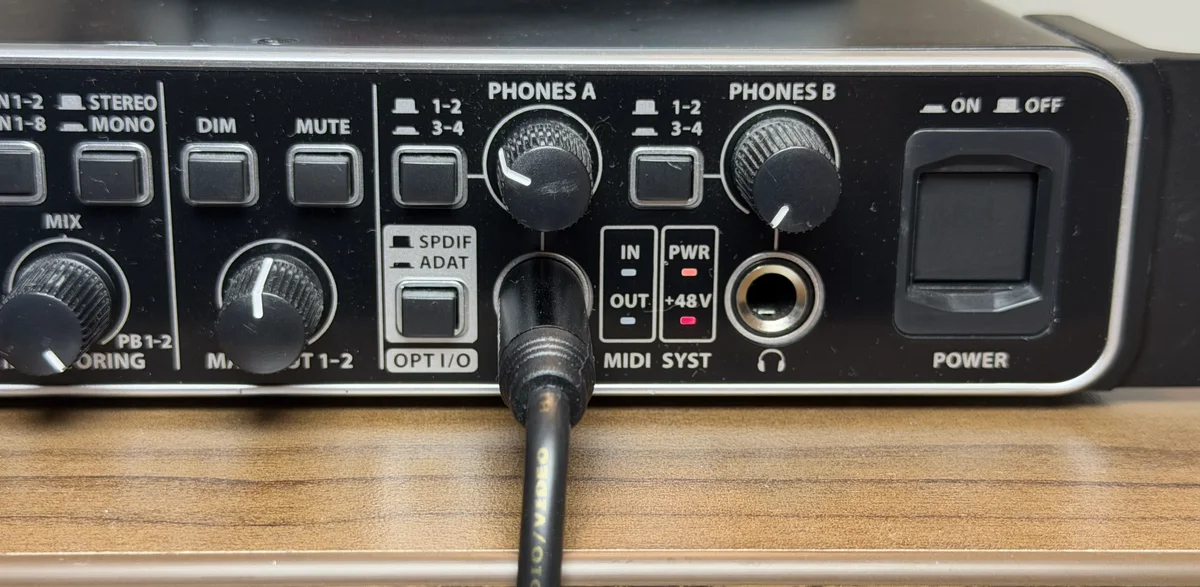
- **HD 650 into the MAIN phones output** of the [Behringer UMC1820](https://www.amazon.com/dp/B01EXI8Y9S?tag=engineersport-20) — not an auxiliary output pair. In this tested iOS route, playback arrived on USB output channels 1–2; attempts to target higher output pairs were silent. Biquadia therefore drives the main pair and says so on screen. Use the main jack unless your own interface-and-app combination proves a different mapping.
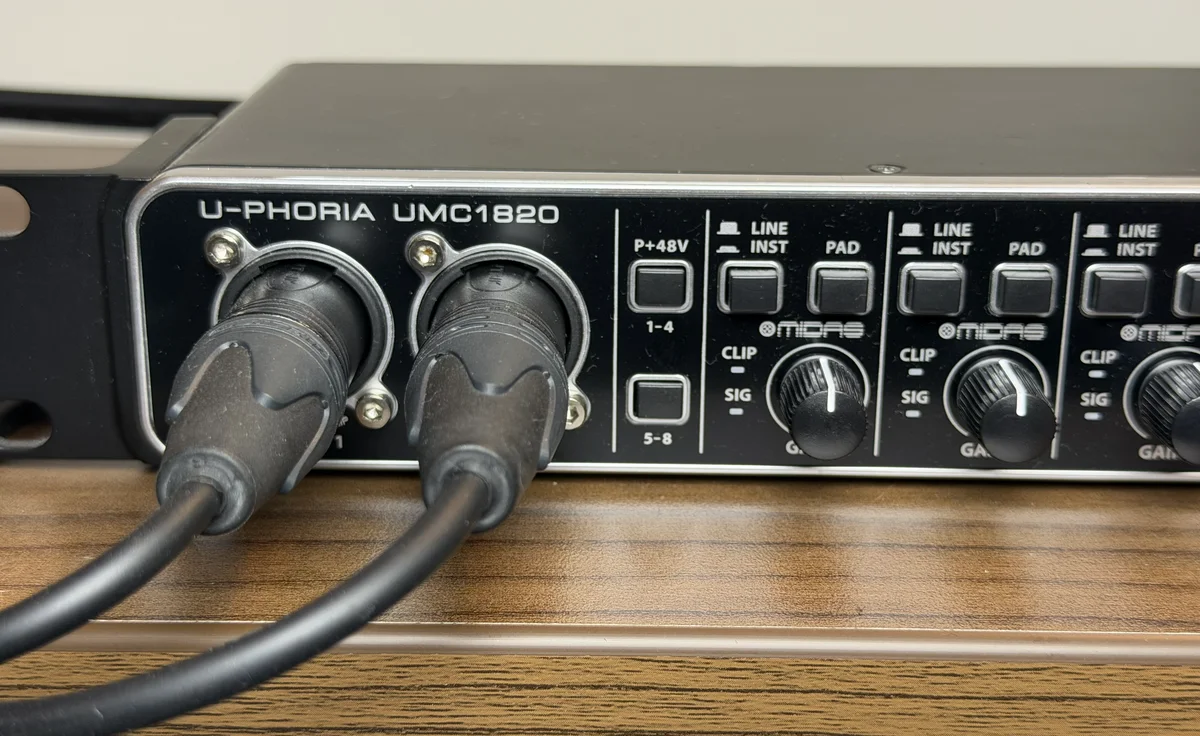
- **Left ear mic → input 1, right ear mic → input 2.** The Session sheet's input-routing picker maps any hardware channel to either engine input, so nothing breaks if your rig is wired differently — but 1/2 is the convention the wizard's checklist assumes.
- **Lock both gains.** The calibration describes one unchanging chain: mic-preamp gain *and* phones-output level. Moving either control afterwards silently invalidates the fitted offset. Mark the knob positions with tape.
- **I/O mode: Full Duplex.** Measurement plays a signal out and captures the response simultaneously. Biquadia's Measure lab checks this and offers a one-tap "Switch to Full Duplex" fix if the session is in a mic-only or playback-only mode.

<div class="my-8 grid grid-cols-1 gap-6 rounded-[18px] border border-paper-line bg-paper p-6 shadow-[0_10px_30px_-16px_rgba(22,32,46,0.24)] md:grid-cols-12 md:items-center">
  <div class="space-y-4 md:col-span-7 flex flex-col justify-center">
    <div class="overflow-hidden rounded-[16px] border border-paper-line bg-white p-2 shadow-sm">
      <img src="/images/blog/binaural-head-headphone-measurement/p2-umc-front-1.webp" width="1200" height="587" alt="Behringer UMC1820 front panel showing the HD 650 cable connected to the main Phones A output" loading="lazy" class="block h-auto w-full rounded-[12px]">
    </div>
    <div class="overflow-hidden rounded-[16px] border border-paper-line bg-white p-2 shadow-sm">
      <img src="/images/blog/binaural-head-headphone-measurement/p2-umc-front-2.webp" width="1200" height="736" alt="Behringer UMC1820 front panel showing the left and right ear microphone cables plugged into Inputs 1 and 2 with their gain knobs fixed" loading="lazy" class="block h-auto w-full rounded-[12px]">
    </div>
  </div>
  <div class="md:col-span-5 flex justify-center">
    <div class="relative mx-auto w-full max-w-[260px] sm:max-w-[275px]">
      <div class="relative overflow-hidden rounded-[38px] border-[4px] border-[#3a393d] bg-black p-[5px] shadow-[0_16px_40px_rgba(0,0,0,0.32)] ring-1 ring-white/10">
        <div class="absolute top-[10px] left-1/2 z-20 h-[14px] w-[64px] -translate-x-1/2 rounded-full bg-black"></div>
        <div class="overflow-hidden rounded-[32px]">
          <img src="/images/blog/binaural-head-headphone-measurement/s2-io-mixer.webp" width="660" height="1434" alt="Biquadia I/O Channel Mixer sheet showing the UMC1820 as 10 inputs and 12 outputs, with live peak level meters on input channels 0 and 1 from the dummy head's ear microphones" loading="lazy" class="block h-auto w-full">
        </div>
      </div>
    </div>
  </div>
</div>

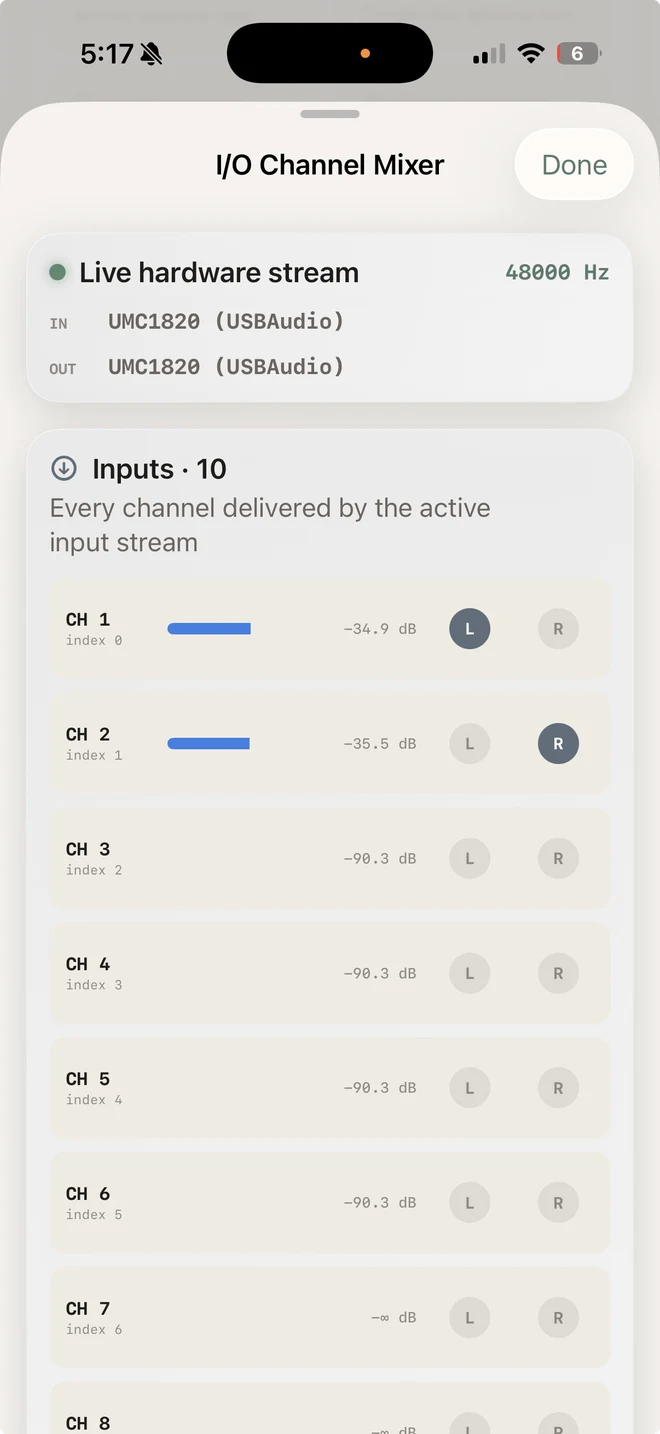
The I/O Channel Mixer (System tab) is the rig's truth panel: all 10 input channels with live peak meters. Ear mics on 0–1 showing active signal, open preamps idling near −90 dBFS, unconnected S/PDIF channels silent. Thirty seconds here confirms the whole capture side before you measure anything.

<div class="my-8 rounded-[20px] border border-[#4f3972] bg-[#151023] p-5 text-[#f8f4ff] shadow-[0_18px_40px_-18px_rgba(41,21,74,0.64)] sm:p-6">
  <div class="mb-3 flex flex-col gap-2 sm:flex-row sm:items-center sm:justify-between">
    <h3 class="my-0 flex items-center gap-2 text-lg font-bold text-[#faf7ff]"><span aria-hidden="true">◉</span> Spatial Binaural Auditioning: Voice Walkaround</h3>
    <span class="w-max rounded-full border border-[#7052a3] bg-[#2b1d43] px-2.5 py-1 font-mono text-[10px] font-semibold tracking-[0.12em] text-[#e2caff]">SR3D DUMMY-HEAD CAPTURE</span>
  </div>
  <p class="mb-4 text-sm leading-relaxed text-[#dacbed]">A voice begins center-front, moves to the right ear, crosses to the left, then returns to center-front. The capture has a <strong class="text-[#fffaff]">+26 dB gain raise</strong> applied equally to both ears, so the interaural level differences survive intact; start at a low volume, then <strong class="text-[#fffaff]">wear headphones</strong> to experience the spatial pinna transfer function.</p>
  <audio controls preload="metadata" class="mb-4 w-full rounded-lg">
    <source src="/audio/blog/binaural-head-headphone-measurement/binaural-walkaround.mp3" type="audio/mpeg">
    <source src="/audio/blog/binaural-head-headphone-measurement/binaural-walkaround-48k.wav" type="audio/wav">
    Your browser does not support the audio element.
  </audio>
  <div class="flex flex-col gap-2 border-t border-[#4f3972] pt-3 text-xs text-[#c8b8dc] sm:flex-row sm:items-center sm:justify-between">
    <span>12.4 s · Stereo binaural · +26 dB gain, −1 dBFS ceiling · 48 kHz / 16-bit · 320 kbps MP3 preview</span>
    <a href="/audio/blog/binaural-head-headphone-measurement/binaural-walkaround-48k.wav" download class="flex items-center gap-1 font-semibold text-[#e2caff] underline decoration-[#8664b6] underline-offset-4 hover:text-white">
      <span>↓ Download gained 48 kHz / 16-bit WAV (2.3 MB)</span>
    </a>
  </div>
</div>

## The 1 V at 1 kHz = 103 dB SPL nominal reference

The interface reports relative **dBFS** (decibels relative to digital full scale). That number alone says nothing about pressure at an ear-canal microphone. The meter does not measure pressure directly; it ties a known 1 kHz voltage at the *loaded* headphone terminals to Sennheiser's stated sensitivity, while the ear capsules record the corresponding digital level. That creates an indicated dB SPL reference for this fixed chain.

<figure>
  <img src="/images/blog/binaural-head-headphone-measurement/p2-multimeter-splitter.webp" width="1500" height="1608" alt="True-RMS multimeter probes on the quarter-inch Y-splitter measuring AC voltage across the HD 650 terminals while a 1 kHz calibration tone plays, headphones still connected and on the dummy head" loading="lazy">
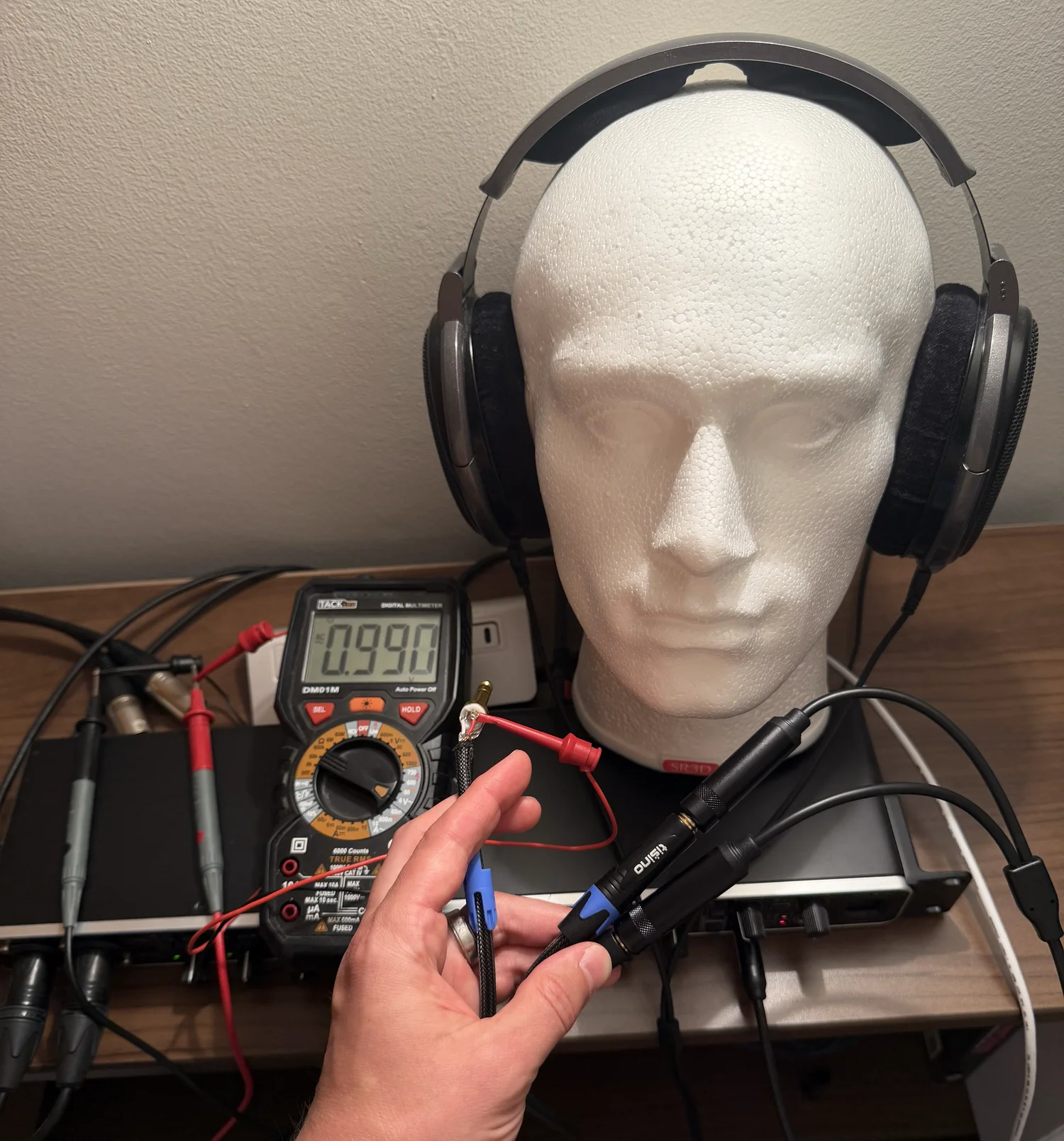
  <figcaption>Reading the 1 kHz calibration voltage: probes tip-to-sleeve on the <a href="https://www.amazon.com/dp/B083XSGNS8?tag=engineersport-20">HOSONGIN Y-splitter's</a> free leg, with the HD 650 still loaded and on the head. The photographed 0.990 V RMS maps to a nominal 102.9 dB SPL reference.</figcaption>
</figure>

Sennheiser specifies the [HD 650](https://www.amazon.com/dp/B00018MSNI?tag=engineersport-20) at **103 dB SPL for 1.00 V RMS at 1 kHz**, with a nominal impedance of 300 Ω. That value appears in Sennheiser's current [official specifications PDF](https://cdn.sennheiser-hearing.com/product-documents/product-downloads/hd-650/safety_instruction/Safety_Guide_HD_650.pdf) and on printed page 5 of the [legacy HD 650 manual mirrored by B&H](https://www.bhphotovideo.com/lit_files/96698.pdf). Adjust the generator or interface volume until a suitable true-RMS meter (such as the [Fluke 87V](https://www.amazon.com/dp/B0002YFD1K?tag=engineersport-20)) reads **1.00 V RMS** across a loaded channel while the 1 kHz sine plays. Verify tip-to-sleeve and ring-to-sleeve once during setup; a single reading does not prove that both amplifier channels track identically. The resulting **103 dB SPL is the manufacturer's nominal reference**, not a fresh acoustic measurement of this individual driver, pad seal, or dummy ear.

At 1 kHz, voltage scaling is valid while the electronics and driver remain linear. Writing the voltage ratio explicitly keeps the logarithm dimensionless:

$$
L_{\mathrm{nom},1\,\mathrm{kHz}}(V) = S_{\mathrm{HD\,650},1\,\mathrm{kHz}} + 20 \cdot \log_{10}\!\left(\frac{V_{\mathrm{RMS}}}{1.00\ \mathrm{V\ RMS}}\right)
$$

Here $S_{\mathrm{HD\,650},1\,\mathrm{kHz}} = 103\ \mathrm{dB\ SPL}$ is the level stated at the **1 V RMS, 1 kHz reference condition**—not a quantity with units of dB/V. If $V_{\mathrm{RMS}}$ is entered numerically in volts, the common shorthand is $103 + 20\log_{10}(V_{\mathrm{RMS}})$; its hidden denominator is 1 V.

For the HD 650 at 1 kHz:
- At $V_{\mathrm{RMS}} = 1.00\text{ V}$, $L_{\mathrm{nom},1\,\mathrm{kHz}} = 103 + 20\log_{10}(1.00/1.00) = \mathbf{103.0\text{ dB SPL}}$ nominal.
- At $V_{\mathrm{RMS}} = 0.27\text{ V}$, $L_{\mathrm{nom},1\,\mathrm{kHz}} = 103 + 20\log_{10}(0.27/1.00) \approx \mathbf{91.6\text{ dB SPL}}$ nominal.
- At the photographed $V_{\mathrm{RMS}} = 0.990\text{ V}$, $L_{\mathrm{nom},1\,\mathrm{kHz}} \approx \mathbf{102.9\text{ dB SPL}}$ nominal.

For each ear, Biquadia compares that nominal reference with the simultaneously captured 1 kHz RMS level in dBFS, using the same measurement window for every tone rung:

$$
O_{\mathrm{ear},1\,\mathrm{kHz}} = L_{\mathrm{nom},1\,\mathrm{kHz}} - L_{\mathrm{captured,ear,dBFS}}
$$

As long as the phones-output level, preamp gain, and routing stay unchanged, $L_{\mathrm{captured,dBFS}} + O_{\mathrm{ear},1\,\mathrm{kHz}}$ produces a repeatable, electrically referenced **1 kHz indication**. The six-rung ladder tests whether the transfer is linear and reports the residual fit; it cannot remove uncertainty in HD 650 unit sensitivity, pad seal, dummy-ear geometry, or microphone response. Its internal fit is therefore distinct from Biquadia's wider **±6 dB absolute (95%)** method estimate. A scalar 1 kHz offset does not make a broadband or weighted level traceable: away from 1 kHz, capsule and fixture response dominate until they are acoustically calibrated or compensated.

<div class="my-8 grid grid-cols-1 gap-6 sm:grid-cols-3">
  <div class="relative mx-auto w-full max-w-[250px]">
    <div class="relative overflow-hidden rounded-[38px] border-[4px] border-[#3a393d] bg-black p-[5px] shadow-[0_16px_40px_rgba(0,0,0,0.32)] ring-1 ring-white/10">
      <div class="absolute top-[10px] left-1/2 z-20 h-[14px] w-[64px] -translate-x-1/2 rounded-full bg-black"></div>
      <div class="overflow-hidden rounded-[32px]">
        <img src="/images/blog/binaural-head-headphone-measurement/s2-cal-method.webp" width="660" height="1434" alt="Biquadia calibration wizard method step: three method cards — Reference tone + multimeter marked Recommended, Acoustic calibrator marked Reference, and Transfer function only" loading="lazy" class="block h-auto w-full">
      </div>
    </div>
  </div>
  <div class="relative mx-auto w-full max-w-[250px]">
    <div class="relative overflow-hidden rounded-[38px] border-[4px] border-[#3a393d] bg-black p-[5px] shadow-[0_16px_40px_rgba(0,0,0,0.32)] ring-1 ring-white/10">
      <div class="absolute top-[10px] left-1/2 z-20 h-[14px] w-[64px] -translate-x-1/2 rounded-full bg-black"></div>
      <div class="overflow-hidden rounded-[32px]">
        <img src="/images/blog/binaural-head-headphone-measurement/s2-cal-rung.webp" width="660" height="1434" alt="Biquadia calibration wizard setup step showing the complete signal path and checks for loaded headphones, binaural inputs, fixed preamp gain, and AC-voltage probes on the Y-splitter" loading="lazy" class="block h-auto w-full">
      </div>
    </div>
  </div>
  <div class="relative mx-auto w-full max-w-[250px]">
    <div class="relative overflow-hidden rounded-[38px] border-[4px] border-[#3a393d] bg-black p-[5px] shadow-[0_16px_40px_rgba(0,0,0,0.32)] ring-1 ring-white/10">
      <div class="absolute top-[10px] left-1/2 z-20 h-[14px] w-[64px] -translate-x-1/2 rounded-full bg-black"></div>
      <div class="overflow-hidden rounded-[32px]">
        <img src="/images/blog/binaural-head-headphone-measurement/s2-cal-results.webp" width="660" height="1434" alt="Biquadia calibration wizard voltage-entry step showing the first of six 1000 Hz tone readings at minus 6 dBFS, completed microphone capture, 0.529 volts AC entered, and the numeric keypad" loading="lazy" class="block h-auto w-full">
      </div>
    </div>
  </div>
</div>

The calibration wizard walks through this step by step:
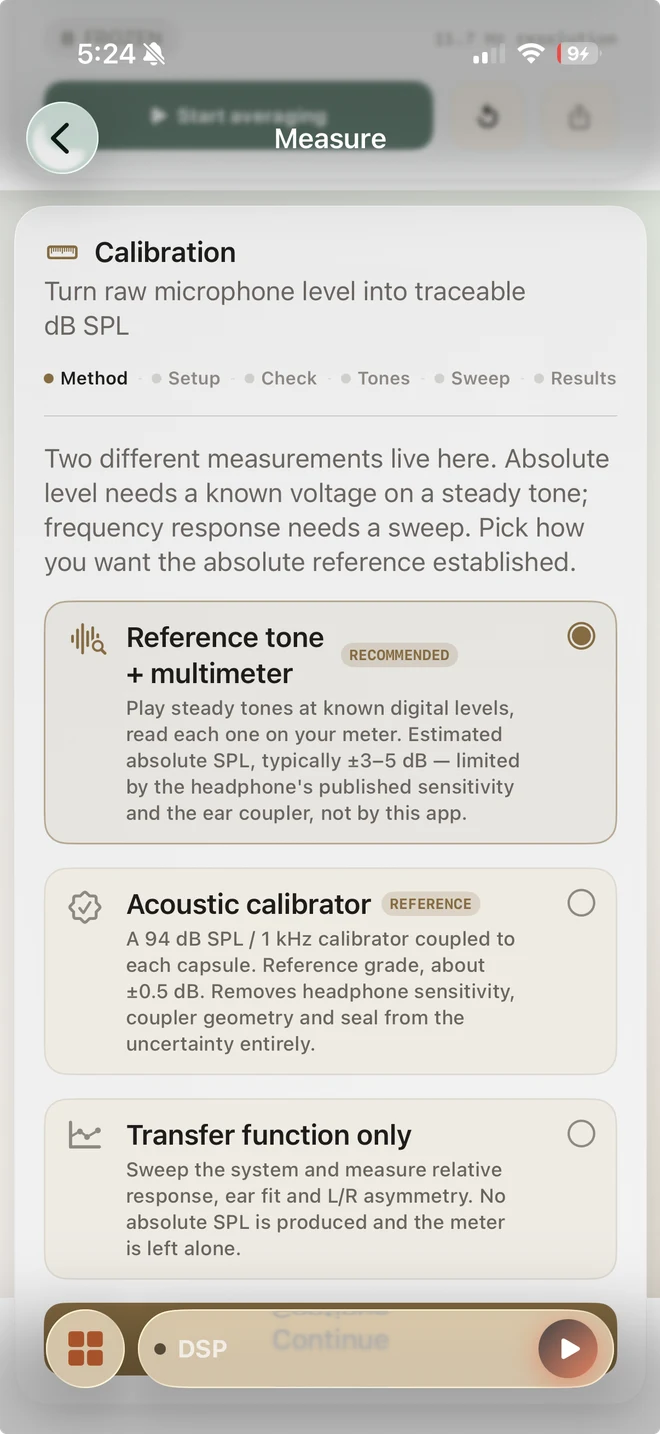
1. **Method selection:** Pick "Reference tone + multimeter" for a binaural head whose permanently mounted capsules cannot accept an acoustic calibrator.
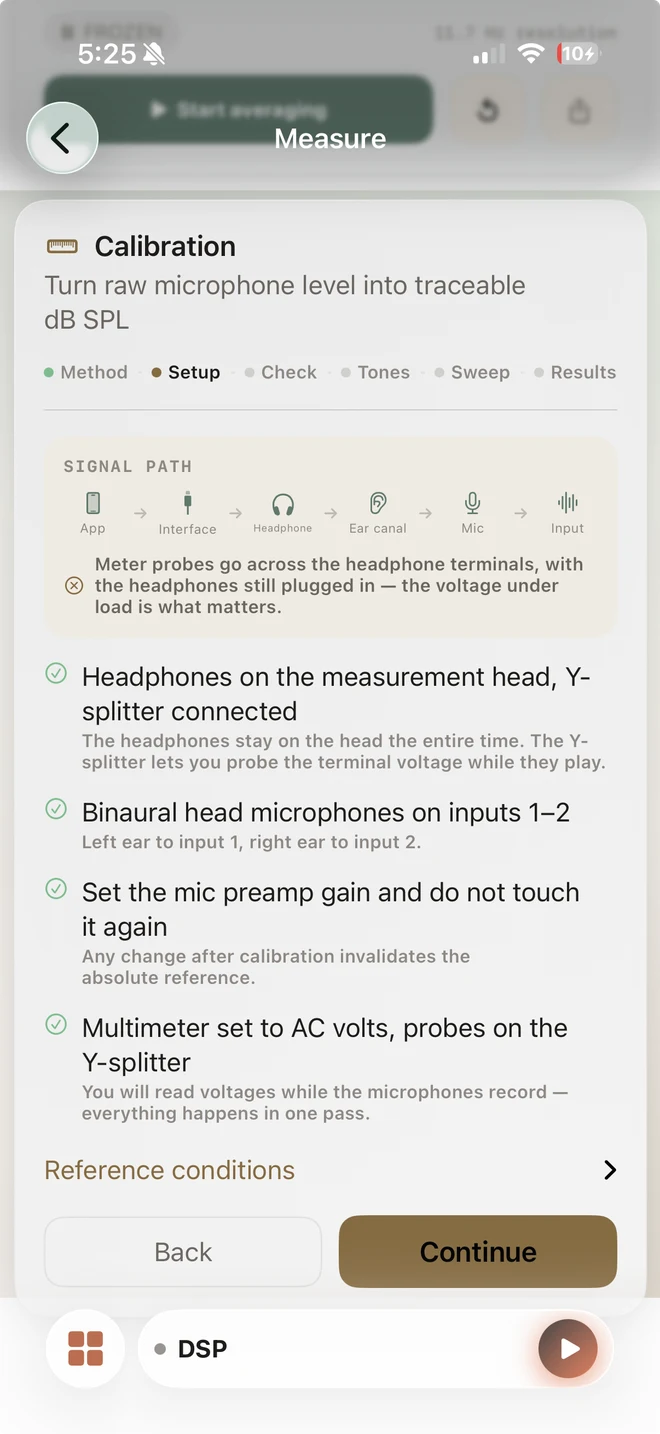
2. **Setup lock:** Confirm the loaded headphone path, left/right input assignment, fixed preamp and phones-output gains, and AC meter probe placement before recording.
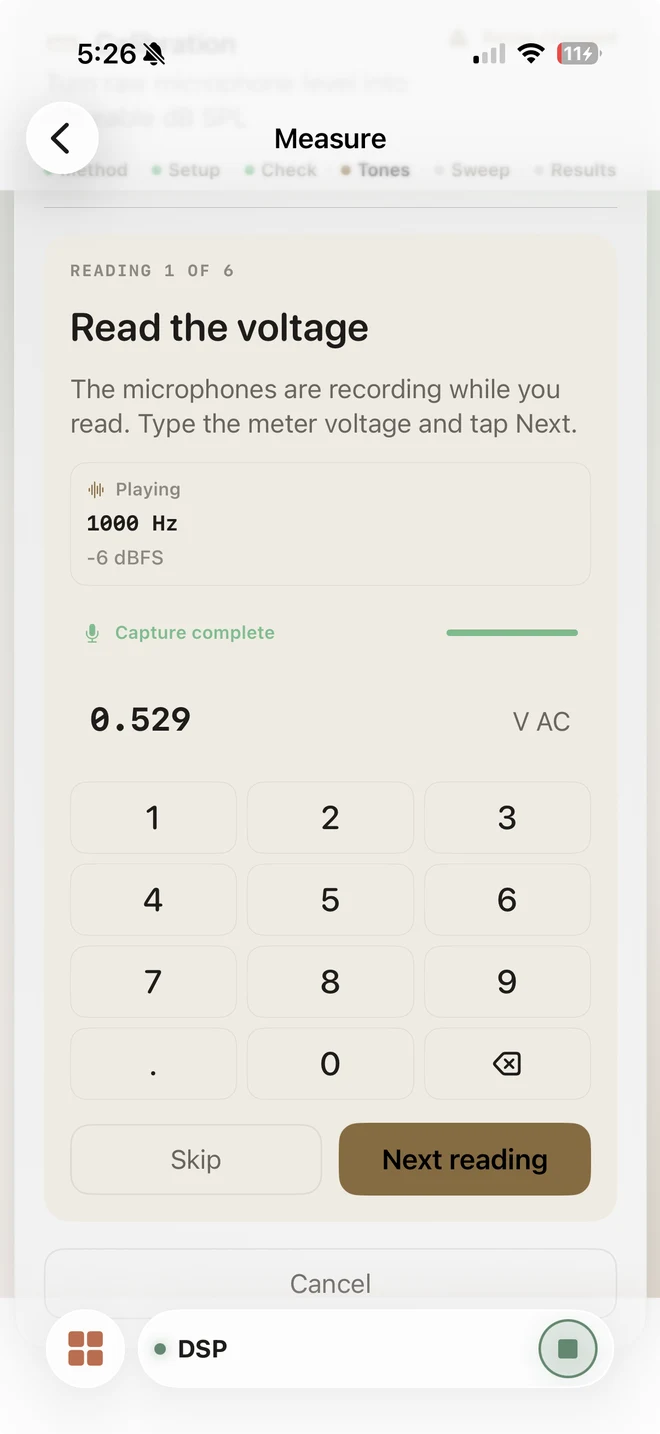
3. **Tone ladder & voltage entry:** Play six 1 kHz reference tones, enter the measured loaded AC RMS voltage for each rung, and use the simultaneous ear captures to test linearity and calculate fit residual.
4. **Independent ear offsets:** Biquadia solves each ear separately. The photographed run produced **L +115.48 dB / R +111.48 dB**, with a **±0.12 dB** internal-fit figure and a separate **±6 dB absolute (95%)** method estimate.

<div class="my-8 grid grid-cols-1 gap-6 rounded-2xl border border-paper-line bg-paper p-6 shadow-[0_10px_30px_-16px_rgba(22,32,46,0.24)] md:grid-cols-12">
  <div class="md:col-span-5 flex justify-center">
    <div class="relative mx-auto w-full max-w-[260px] sm:max-w-[275px]">
      <div class="relative overflow-hidden rounded-[38px] border-[4px] border-[#3a393d] bg-black p-[5px] shadow-[0_20px_50px_rgba(0,0,0,0.5)] ring-1 ring-white/10">
        <div class="absolute top-[10px] left-1/2 z-20 h-[14px] w-[64px] -translate-x-1/2 rounded-full bg-black"></div>
        <div class="overflow-hidden rounded-[32px] bg-black aspect-[720/1564]">
          <video controls muted playsinline preload="metadata" poster="/images/blog/binaural-head-headphone-measurement/p2-calibration-demo-poster.webp" class="block h-auto w-full">
            <source src="/images/blog/binaural-head-headphone-measurement/p2-calibration-demo.mp4" type="video/mp4">
            Your browser does not support the video tag.
          </video>
        </div>
      </div>
    </div>
  </div>
  <div class="md:col-span-7 flex flex-col justify-center">
    <h4 class="mt-0 mb-3 flex items-center gap-2 text-base font-bold text-paper-ink"><span aria-hidden="true">◉</span> Live PIP calibration demonstration</h4>
    <p class="mb-4 text-sm text-paper-muted">The Biquadia wizard runs the 1 kHz reference ladder on the SR3D + HD 650 rig, with the Fluke 87V visible in the picture-in-picture overlay.</p>
    <div class="space-y-3">
      <div class="rounded-xl border border-paper-line bg-white p-3">
        <div class="flex items-start gap-2">
          <span class="mt-0.5 text-cyan-400 text-sm">①</span>
          <div>
            <div class="text-sm font-semibold text-paper-ink">1 kHz reference tone ladder</div>
            <div class="mt-0.5 text-xs text-paper-muted">Six descending dBFS rungs. Each plays a 1 kHz sine while the meter reads loaded AC RMS voltage and both ear capsules capture simultaneously.</div>
          </div>
        </div>
      </div>
      <div class="rounded-xl border border-paper-line bg-white p-3">
        <div class="flex items-start gap-2">
          <span class="mt-0.5 text-emerald-400 text-sm">②</span>
          <div>
            <div class="text-sm font-semibold text-paper-ink">Fluke 87V AC RMS reading</div>
            <div class="mt-0.5 text-xs text-paper-muted">The PIP overlay shows ~1.00 V RMS at the reference rung and ~0.27 V at the lowest. The HD 650 remains connected through the Y-splitter.</div>
          </div>
        </div>
      </div>
      <div class="rounded-xl border border-paper-line bg-white p-3">
        <div class="flex items-start gap-2">
          <span class="mt-0.5 text-amber-400 text-sm">③</span>
          <div>
            <div class="text-sm font-semibold text-paper-ink">Dual-channel microphone capture</div>
            <div class="mt-0.5 text-xs text-paper-muted">Left and right EM272 capsules record each rung independently. The live waveform verifies both channels are active and the noise floor is usable.</div>
          </div>
        </div>
      </div>
      <div class="rounded-xl border border-paper-line bg-white p-3">
        <div class="flex items-start gap-2">
          <span class="mt-0.5 text-purple-400 text-sm">④</span>
          <div>
            <div class="text-sm font-semibold text-paper-ink">Per-ear SPL offset fitting</div>
            <div class="mt-0.5 text-xs text-paper-muted">After all rungs, Biquadia solves each ear's dBFS → indicated dB SPL offset: L +115.48 dB / R +111.48 dB, ±0.12 dB internal fit, and ±6 dB absolute (95%) method estimate.</div>
          </div>
        </div>
      </div>
    </div>
  </div>
</div>

## What this calibration supports

With the chain locked, the SR3D dummy head and Biquadia become a practical binaural measurement suite. The calibration adds a declared 1 kHz reference; it does not alter the underlying recordings or turn this fixture into a standards-grade sound-level meter.

- **Level monitoring (dBZ / dBA / dBC):** Display real-time, electrically referenced *indicated* level at the ear-canal capsules with Z, A, or C weighting and Fast/Slow time constants. The weighting filters are DSP; without a capsule/fixture response calibration, their broadband absolute result is not an IEC 61672 claim.
- **Harmonic distortion and THD:** Play 1 kHz test tones and inspect harmonics 2–10, THD+N, SNR, and electrically referenced ear-canal noise floor. The result belongs to the complete playback-and-capture chain—DAC, amplifier, HD 650, seal, microphones, and ADC—not to the headphone driver alone.
- **Binaural headphone capture:** Record paired 48 kHz WAV signals directly from the ear capsules for A/B comparison and spatial auditioning. The files retain their native left/right transfer functions; do not sum them to mono, which can introduce comb filtering.

## Gotchas

- **The exact-zero USB input.** Twice on this rig, the [Behringer UMC1820](https://www.amazon.com/dp/B01EXI8Y9S?tag=engineersport-20) enumerated, negotiated all 10 channels, and delivered perfectly formed buffers of literal digital zero after another USB device had connected first. A working analog mic path normally shows a non-zero noise floor; exact zeros mean the input stream is not flowing. Biquadia detects the signature and says so (unplug, replug, restart the engine). If you build your own tooling: gate on dBFS, not calibrated SPL—a calibration offset can make digital silence read as a plausible room level.
- **Y-splitter probe placement.** Measure tip-to-sleeve for left and ring-to-sleeve for right on the [HOSONGIN TRS Y-splitter](https://www.amazon.com/dp/B083XSGNS8?tag=engineersport-20). Tip-to-ring reads left *minus* right: two nearly identical signals can produce ~0 V while everything else appears normal.
- **Measure loaded, not open-circuit.** For the usual voltage-source/resistive-load approximation, unplugging the headphones biases the reading high by 20·log₁₀(1 + Z<sub>out</sub>/Z<sub>load</sub>). At 1 kHz, substituting 300 Ω gives a small error for a good amp and more than 1 dB for a 50 Ω output. Real headphone impedance is frequency-dependent, another reason the reference stays at 1 kHz.
- **Quiet room, genuinely.** The wizard measures the noise floor per ear before the ladder and aborts if it exceeds −40 dBFS — a floor captured during the USB spin-up once read −5 dBFS and poisoned every rung's SNR check downstream.
- **Meters don't monitor.** Biquadia mutes live input-to-output monitoring in the Measure lab; with mics and speakers on one interface, an open monitor path is an acoustic feedback loop waiting for a gain knob.

## Turn your phone into the analyzer

[Biquadia's](https://biquadia.makerportal.ai/) Measure lab runs the workflow in this post—loaded 1 V / 103 dB nominal-reference calibration at 1 kHz, THD analysis, and an explicitly qualified level display—100% on-device, with no network or desktop required.

Previously in this series: [real-time acoustic beamforming on an iPhone with the miniDSP UMA-8 mic array](/blog/uma-8-beamforming-iphone) — including what a 44 mm aperture honestly can and cannot do.

## Questions this note answers

### Can you measure headphone sound pressure levels accurately without laboratory equipment?

Yes — with a stated uncertainty and the right electrical reference. A binaural dummy head, class-compliant USB interface, and multimeter can map relative digital dBFS readings to an indicated dB SPL scale. For the HD 650, 1.00 V RMS at 1 kHz maps to Sennheiser's nominal 103 dB SPL specification; headphone tolerance, pad seal, ear geometry, and the microphone response keep this from being a laboratory-grade absolute calibration.

### What does the multimeter do in a headphone measurement setup?

It supplies an electrical reference. Reading the loaded AC RMS voltage at 1 kHz while known digital tones play, then combining that voltage with the headphone's published 1 V sensitivity, creates a repeatable dBFS-to-indicated-dB-SPL offset. It is a practical 1 kHz transfer calibration within a few dB, not a replacement for a traceable acoustic calibrator.

### Why measure the voltage under load instead of unplugging the headphones?

The voltage that matters is what the amplifier delivers into the headphone's actual impedance. Under the usual voltage-source/resistive-load approximation, measuring open-circuit reads high by 20·log10(1 + Zout/Zload) — about 0.3 dB for a 10-ohm output into 300 ohms, and over 1 dB at 50 ohms. A Y-splitter keeps the headphones connected while the meter reads the same terminals.

### Do I need a 94 dB acoustic calibrator?

Not to start. The tone-ladder + multimeter method is highly repeatable but is typically limited to roughly ±3–5 dB by the headphone's published sensitivity, pad seal, and coupler geometry; Biquadia conservatively reports ±6 dB at 95% confidence for this method. A 94 dB acoustic calibrator can reduce the capsule reference uncertainty to roughly ±0.5–0.6 dB, but it must physically seal to each capsule.

### Why are the left and right ear measurements different?

Each ear of a binaural head has its own silicone pinna and canal geometry, electret microphone, preamp channel, and earpad seal, so the two transfer functions genuinely differ. The photographed run produced offsets of +115.48 dB left and +111.48 dB right. That is why Biquadia solves each ear independently and never averages them into a mono mix.